
Author

Paul Halliday
Director Software Engineering
Category
Conceal Blog
Published On
Oct 30, 2025
Understanding How Conceal Protects the Browser: Part 2
Extensions don’t live inside a website the way most people imagine. They're not just “a script that runs on top of the page.” They’re closer to a miniature application installed alongside the browser, granted special compartments where they can observe, react, and sometimes intervene, all without breaking the rules of the browser itself.
Unlike normal websites, which get a single realm to run their code, extensions are split across multiple environments, each with a different purpose and level of privilege. No single part of an extension sees everything. Instead, it's distributed, almost like a small team, with specific roles working in different rooms. One listens. One watches. One interacts with the user. And they communicate only through messages. These messages are bound to functions that perform some “work”, much like endpoints on a web API.
It’s easier to see it than to describe it, so let’s take a look at the rooms and realms an extension occupies:
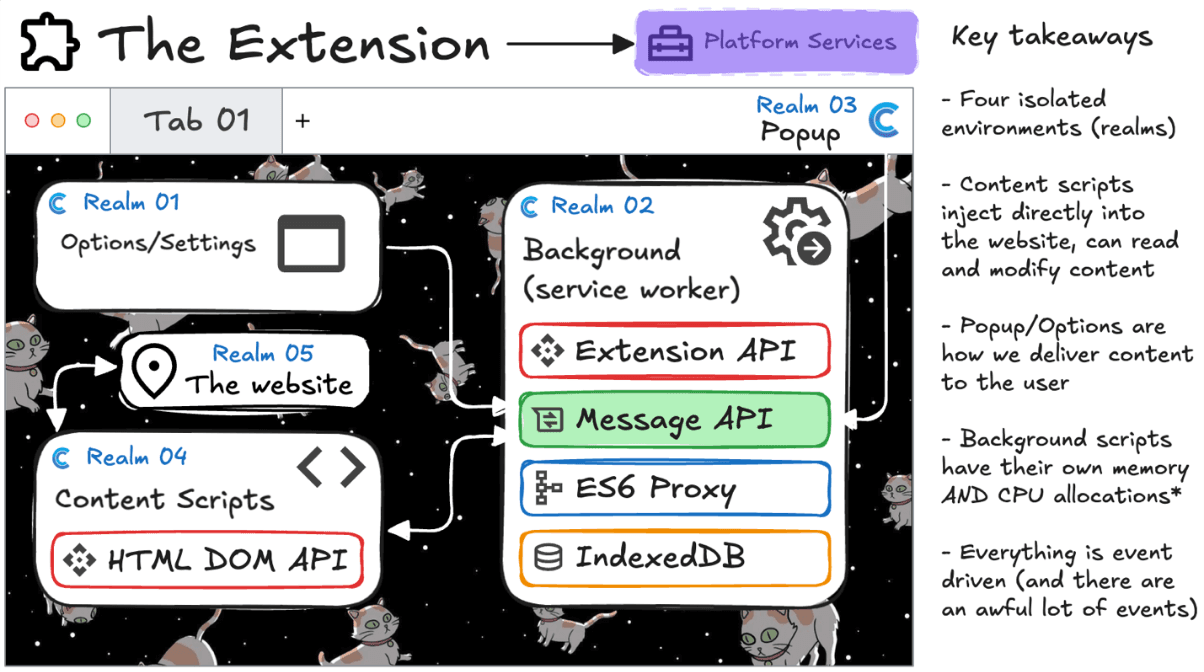
What you’re looking at here are the four main environments an extension can exist in:
Service Worker (Background Realm) – This is the brain. It doesn’t have a UI or touch the page directly. Instead, it lives quietly in the background, waiting for events: tabs opening, URLs changing, messages arriving. It holds memory, talks to storage, and orchestrates what the extension does next. It’s the only part allowed to use powerful Extension APIs like network listeners, alarms, and persistent storage.
Content Scripts (Website Realm) – These are the field agents. They run inside web pages (but in isolated realms), giving the extension a controlled view of the DOM, text, links, inputs, and the living surface of the site. They can read and modify what the user sees, but they cannot access browser internals. If they need help, they must send a message back to the service worker.
Popup & Options Pages (Extension UI Realms) – This is how users talk back. Buttons, toggles, dashboards, and settings all live here. These realms have no direct access to the website or the DOM. If they need information, they ask the service worker. Extensions don’t break into pages; they negotiate with them.
At this point, it's crucial to understand extensions are guests, not gods. They are isolated from websites, isolated from the browser’s core, and even isolated from themselves. Each realm runs in its own sandbox with its own JavaScript engine instance and its own global memory. The only way they communicate is through message passing, which is deliberate, structured, and permissioned.

But Where Does the Work Actually Begin?
An extension doesn’t “run” in the traditional sense. It waits. It listens. Everything it does is triggered by an event: a new tab, a finished navigation, a DOM load or change, a user click, or a message. That’s why understanding structure (where we live) is only half of the story. Next, we need to understand behavior, how everything comes to life.
That brings us to operation, the actual flow of how an extension steps into a page, examines it, and coordinates with the background brain.
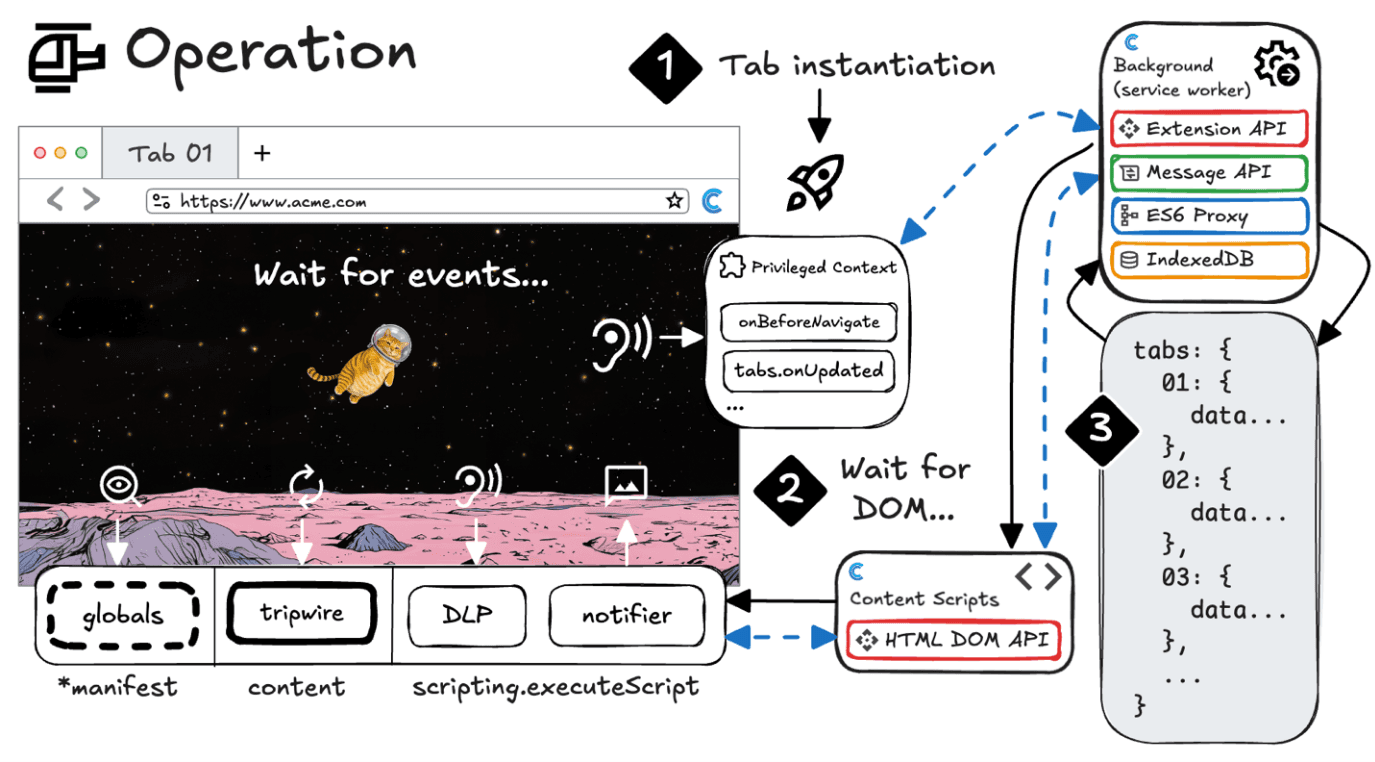
This sequence starts with the browser itself. When a tab is created (1), the service worker is notified. It listens, silently, for changes like URL updates or navigations (onBeforeNavigate, tabs.onUpdated). It hasn’t seen the page yet. It waits.
Only when the page is loading and the DOM becomes available does the extension inject its content scripts (2). Those scripts enter the webpage realm, gaining access to the HTML DOM API, the structure of what the user sees. They don’t get secret tunnels. They get a seat in the audience.
From there, analysis begins: content scripts inspect, gather signals, and send structured reports back to the service worker. The service worker updates extension state, stores observations, and decides whether anything needs to be shown to the user (3), through a pop-up, banner, badge, or alert.
Everything is event-driven. There is no constant loop, no hidden process chewing CPU. The extension breathes only when the browser breathes.
Extension Architecture in Plain Terms
Service Worker: The strategist, offstage, with the map and the keys.
Content Script: The scout, inside the page, is limited but observant.
Popup/Options: The voice, user-facing, asking for permission or offering insight.
They never merge. They never share memory. They only talk. And that discipline is exactly why extensions can exist safely alongside banks, games, scams, and spreadsheets, all in the same browser.
In Part 3, this architecture finally comes to life. We’ll follow how content scripts inspect a page, how signals become scores, and how the service worker decides when a user needs to be warned.
To learn more about Conceal’s approach to Zero Trust Access and Real-Time Browser Security, schedule a demo today.