
Author

Conceal Recon Group
Category
Conceal Recon Group
Published On
Nov 17, 2025
The Winding Path That Leads to Insecurity

Stolen, leaked, or “borrowed” credentials are very frequently used as the first phase in corporate compromises. These credentials give threat actors access to your corporate environment without the need for finding an externally exploitable attack vector. A seasoned threat actor, using illicitly acquired credentials, can stealthily move throughout the enterprise, often remaining undetected for months to years while continuing to pillage your confidential information. Those same credentials can be used by a financially motivated threat actor to quickly wreak havoc on your network, encrypting systems for substantial financial gain. Regardless of the motivation of the attacker, these attacks can result in significant financial and reputational loss for your organization.
There are many ways in which a threat actor can acquire credentials. Simple phishing attacks are at the lower end of the complexity scale. Password reuse has also resulted in the breach of many a corporation. In those cases, even if the employee isn’t using their corporate email address, threat actors are capable of matching usernames and trying the associated passwords until they find one that works. There are large numbers of data breach databases available in the dark web, with new databases being offered for sale frequently. Note: to check if your email might have been compromised, you can consult HaveIBeenPwned, this is a great resource that is updated regularly.
One of the more complicated phishing techniques is known as Adversary in The Middle, often abbreviated as AiTM. Broadly speaking, AiTM describes an attack technique where a threat actor intercepts network communications between two unsuspecting parties to steal or modify information. In our case, we are looking at the use of AiTM to steal login credentials. In this attack scenario, the threat actor somehow gets a victim to click on a URL. This URL leads to infrastructure under the attacker’s control. What makes AiTM attacks so dangerous is if the attacker handles their infrastructure properly, the information presented in their browser is identical to what they would see in a legitimate login sequence. In these cases, the AiTM acts as a proxy. A proxy is an network application that acts as an intermediary server between a client and destination. In essence, rather than a client sending data directly to a destination, the traffic is sent to the proxy. The proxy may just forward the data along to the destination without any modification or it may manipulate the data for privacy, security, or other reasons. The destination then sends the data back to the proxy, which again may manipulate the data which is then ultimately passed back to the client.
The following illustrates what is happening in a AiTM phishing attack
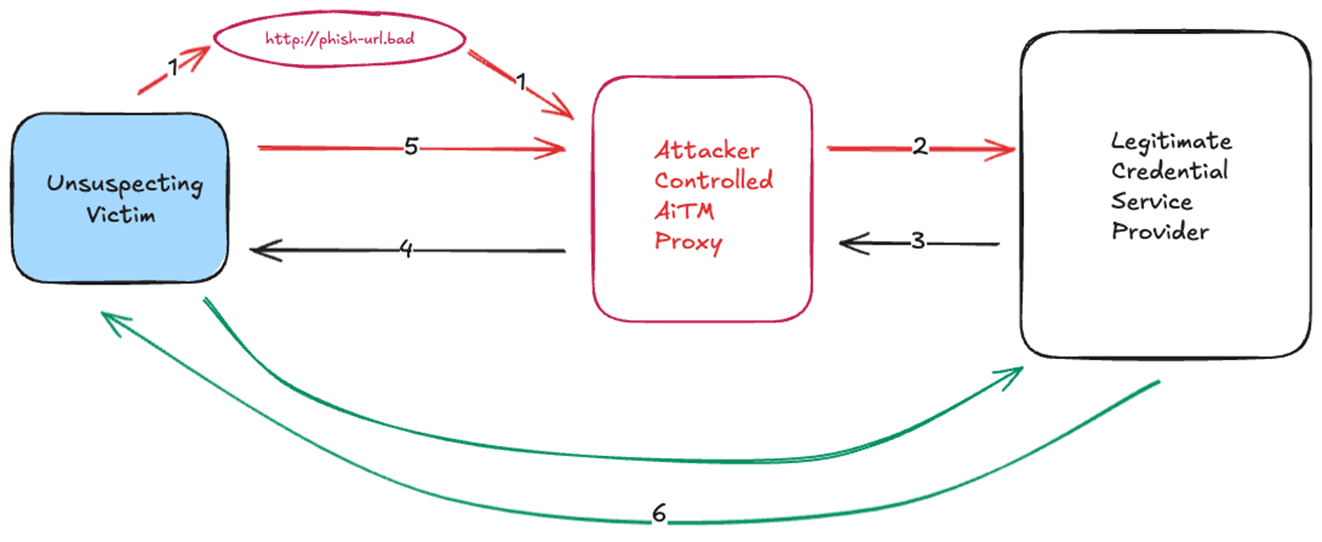
Figure 1 - AiTM Proxy Overview
In this attack, the unsuspecting user receives a phishing attack (either email or webpage) and clicks on the malicious URL (1). This URL is likely disguised to look very similar to what the victim would expect for their normal account verification activities. Often these phishing attacks express some sort of urgency which can make the victim less likely to very carefully inspect the URL and make the bad choice to click as they feel pressured to complete the task as soon as possible. What the user expects to happen is a communicate directly with the legitimate credential server (6). In the case of an AiTM attack, what actually happens is the URL (1) leads to attacker controlled AiTM proxy. The AiTM proxy is configured to send a request to the legitimate credential service provider (2). The credential service provider has no way of knowing that this is a AiTM attack and responds as normal to the attacker controlled AiTM proxy (3). The AiTM proxy then forwards this page directly back to the victim (4) so the page contents are identical as if the user followed path 6. Any follow-on communications, such as password and MFA are traversed through the cycle of 5, 2, 3, 4. While all of this is happening, the AiTM proxy is extracting the login credentials being sent by the victim and any session cookies sent by the credential provider. Once the login transaction is complete, the unsuspecting victim will be sent to their final destination, whether it’s email, a document, or something else. Advanced threat actors will ensure that the user ends at a legitimate destination to not arouse suspicion if they end up at a spot they were not expecting. The AiTM proxy does not add any delay the end user.
Let’s take a journey through a typical AiTM attack. In this case, it will start with a phishing email.
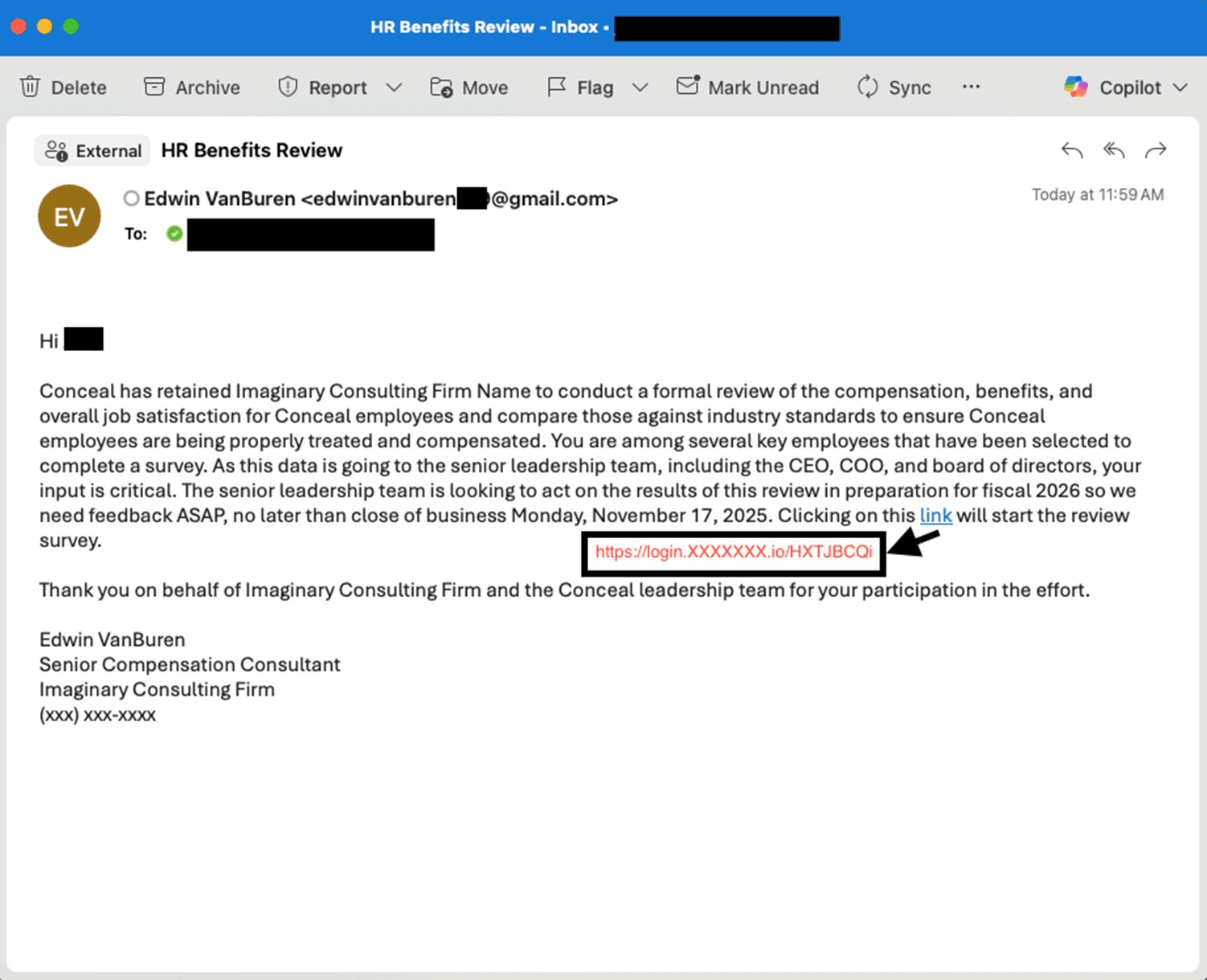
Figure 2 - Phishing Email
As we noted in the Figure 1 - AiTM Proxy Overview, that link is the malicious URL to the attacker’s AiTM proxy (1).
Once the unsuspecting victim clicks on the link, they are taken to a login page. Two things to note in particular on this page. First, the content is a legitimate Microsoft login page. Second, the URL is not pointing to Microsoft but upon a quick look, it appears to be correct. This is a major reason why AiTM attacks can be so successful, in this case, the user sees the login page is what they have seen hundreds of times and a glance at the URL shows the words “login” and “microsoftonline”, so they feel free to proceed to handle the critical task.
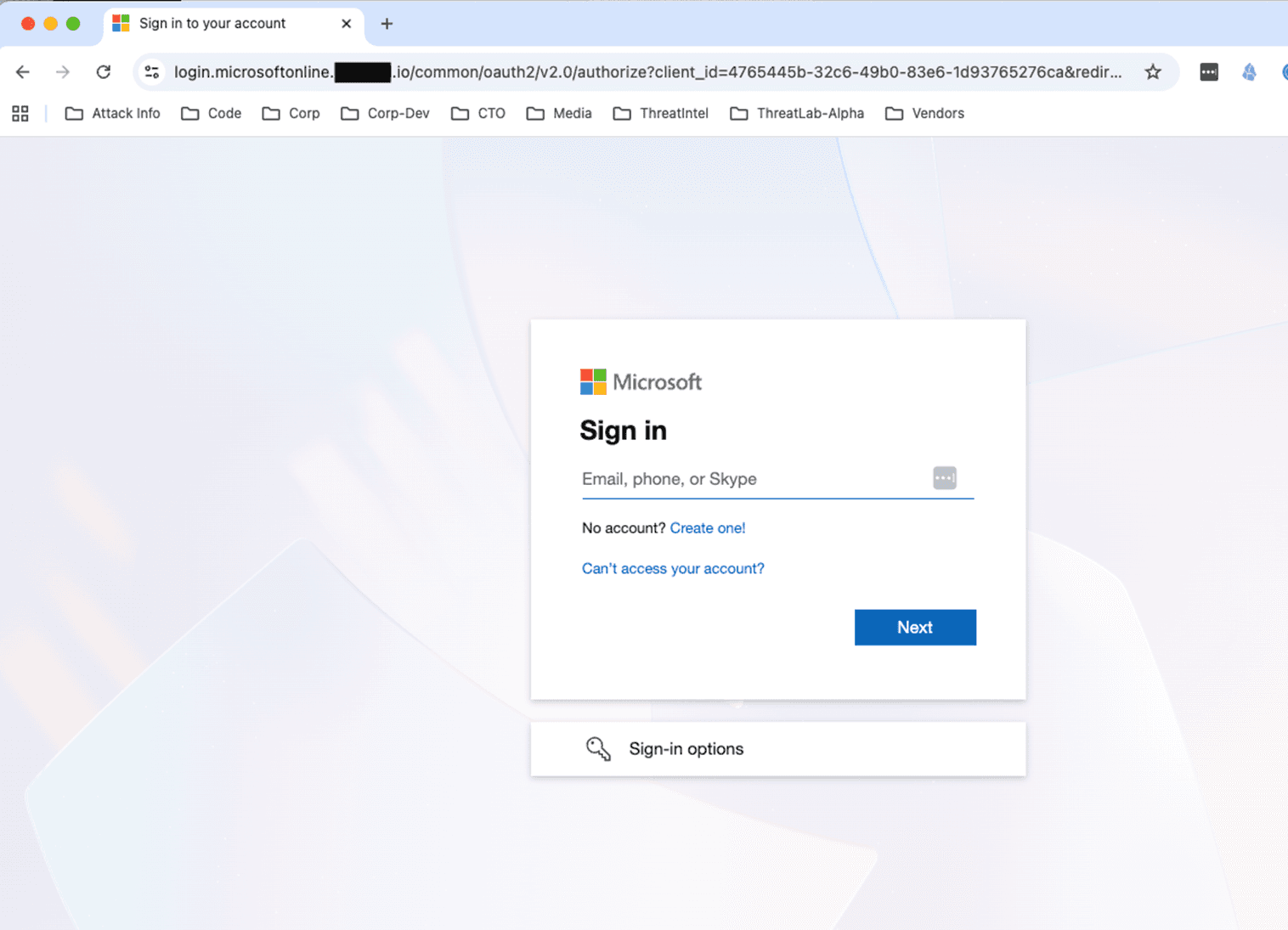
Figure 3 - Initial Legitimate Login Page
Once the victim enters a legitimate email address, the credential provider then sends back the properly branded company password page. Once again, this is completely expected by the user and the URL looks ok’ish. At this point, the AiTM proxy now has a valid username.
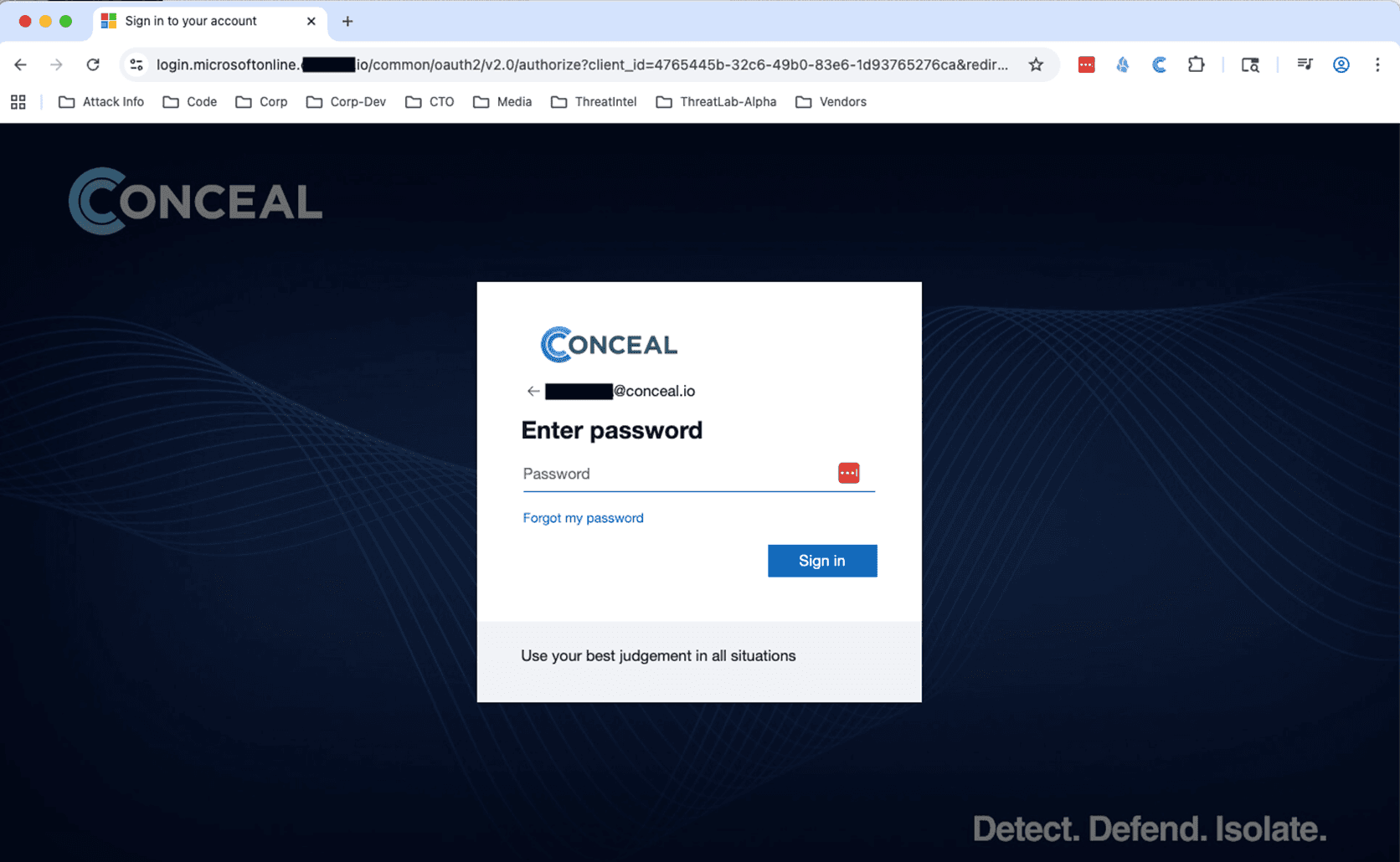
Figure 4 - Company Specific Password Page
Here the victim has entered their valid password, which the AiTM proxy has now captured. If there was no MFA configured, this is where the AiTM journey would end. In this case, there is also a MFA challenge. This challenge would be expected by the user as this is, again, a proper login flow.
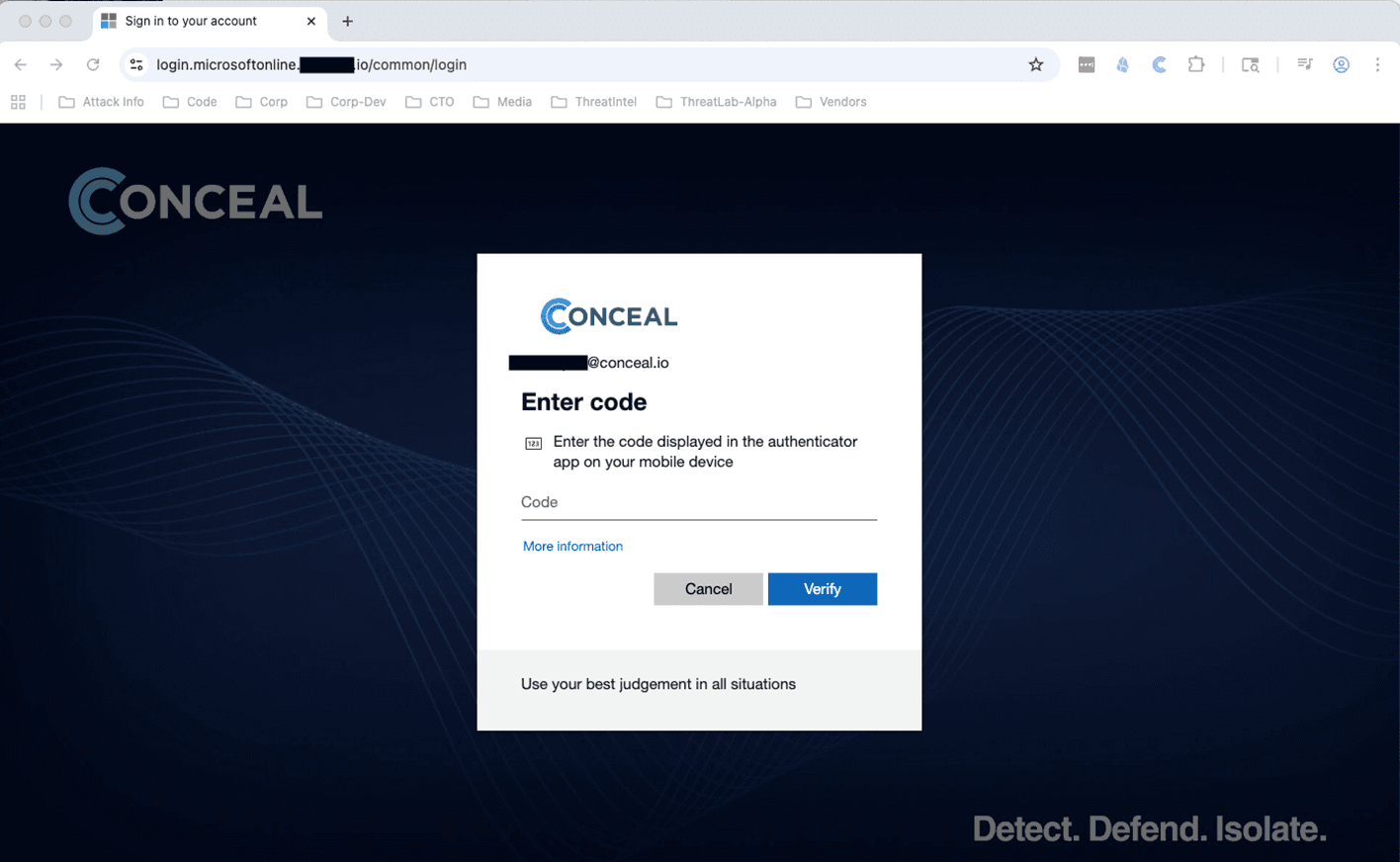
Figure 5 - Company Specific MFA Page
Once the victim has passed the MFA challenge, the login is successful and complete. If the credential provider has provided any session cookies, the AiTM proxy also has this data. Here’s an actual example of the data captured by the AiTM proxy.

Figure 6 - Subset of Data Captured by AiTM Proxy
This type of attack can run against any credential provider. For example, here’s what it might look like against Google. The login page is of Google and the URL is close to OK.
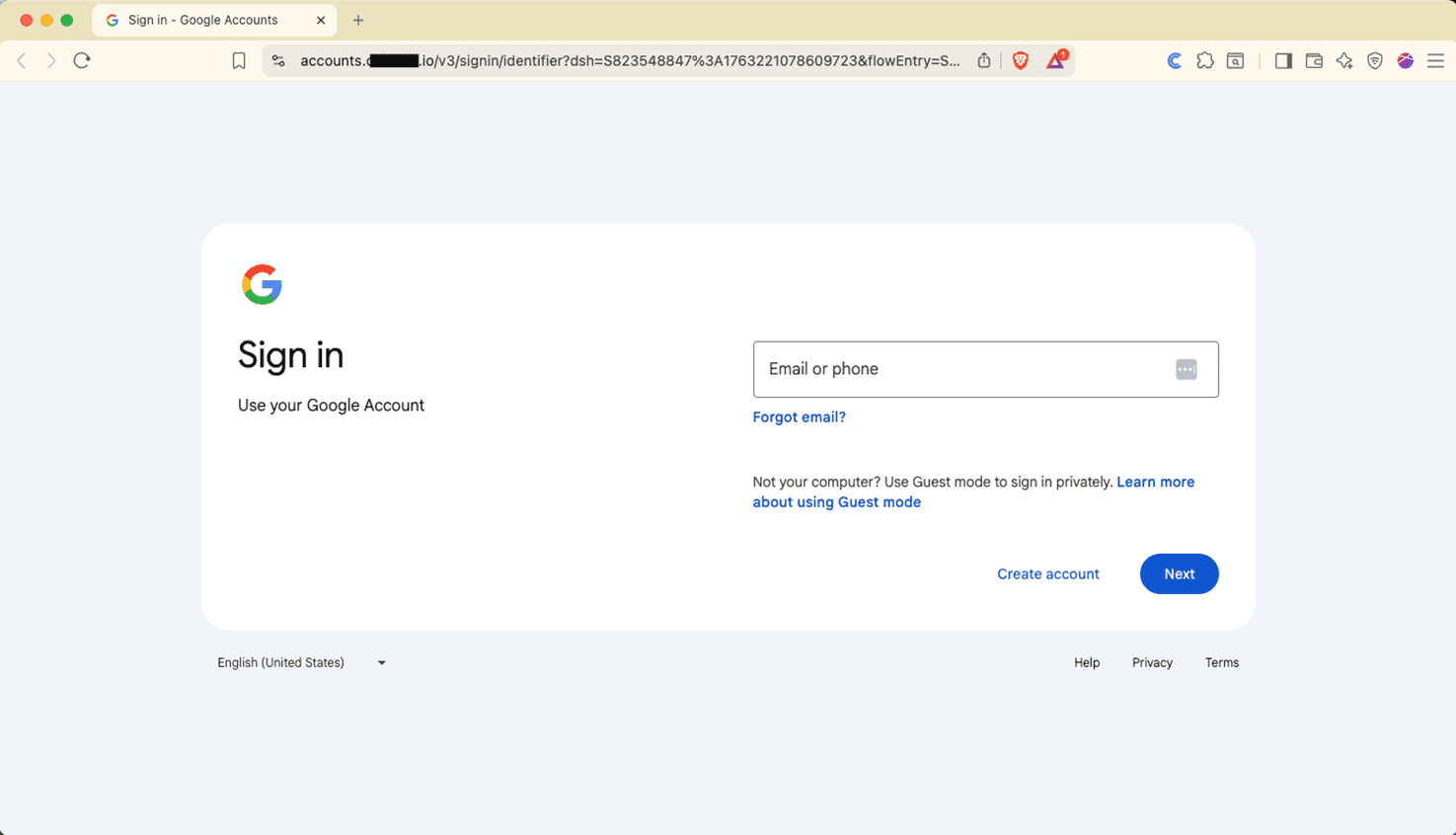
Figure 7 - Google AiTM Attempt
Unless somehow the malicious redirection URL is already known, most security solutions will allow an AiTM attack to pass through and leave it up to the unsuspecting victim to do the right thing and abort before entering any credentials. But remember, the threat actor is very skilled at creating convincing phishing campaigns. They have added enough legitimacy to the phishing email to make it credible. They have also subtly applied psychological pressure that may force a user to act hastily. The AiTM URL looks correct at a quick glance and the login page(s) are exactly what they have seen hundreds of times. If an astute user realizes they’ve been duped, they can quickly change their password, report the incident, and hopefully no real damage has been done. Sadly, this is often not the case as many users will be unaware of the mistake they have made and the damage it may cause. Even if the user does not have administrative access to any accounts, the threat actor now has access to an internal corporate account. This provides more opportunities for the threat actor. For example, they now have the ability to conduct phishing attacks against other company employees using a valid internal account, this often lowers suspicion as many of the phishing email checks users are taught in security trainings now pass muster. They can also use that same email account to start the phishing process against other outside resources such as vendors, partners, etc. but this time the attack is coming from an account the new victim is familiar with, thus lowering initial suspicion. The threat actor can also use this information to move laterally throughout the network in the hopes of finding locally stored information that does not require administrative privileges to access. This also gives the threat actor another username password combination they can try in different locations such as financial institutions, social media, and cloud accounts.
If you are running Conceal, that situation would be completely different. Instead of seeing a Google login page, you would see something similar to the following. In this particular instance, we have changed the detection action from blocking to warning so that you can actually see the legitimate Google login screen in the background.
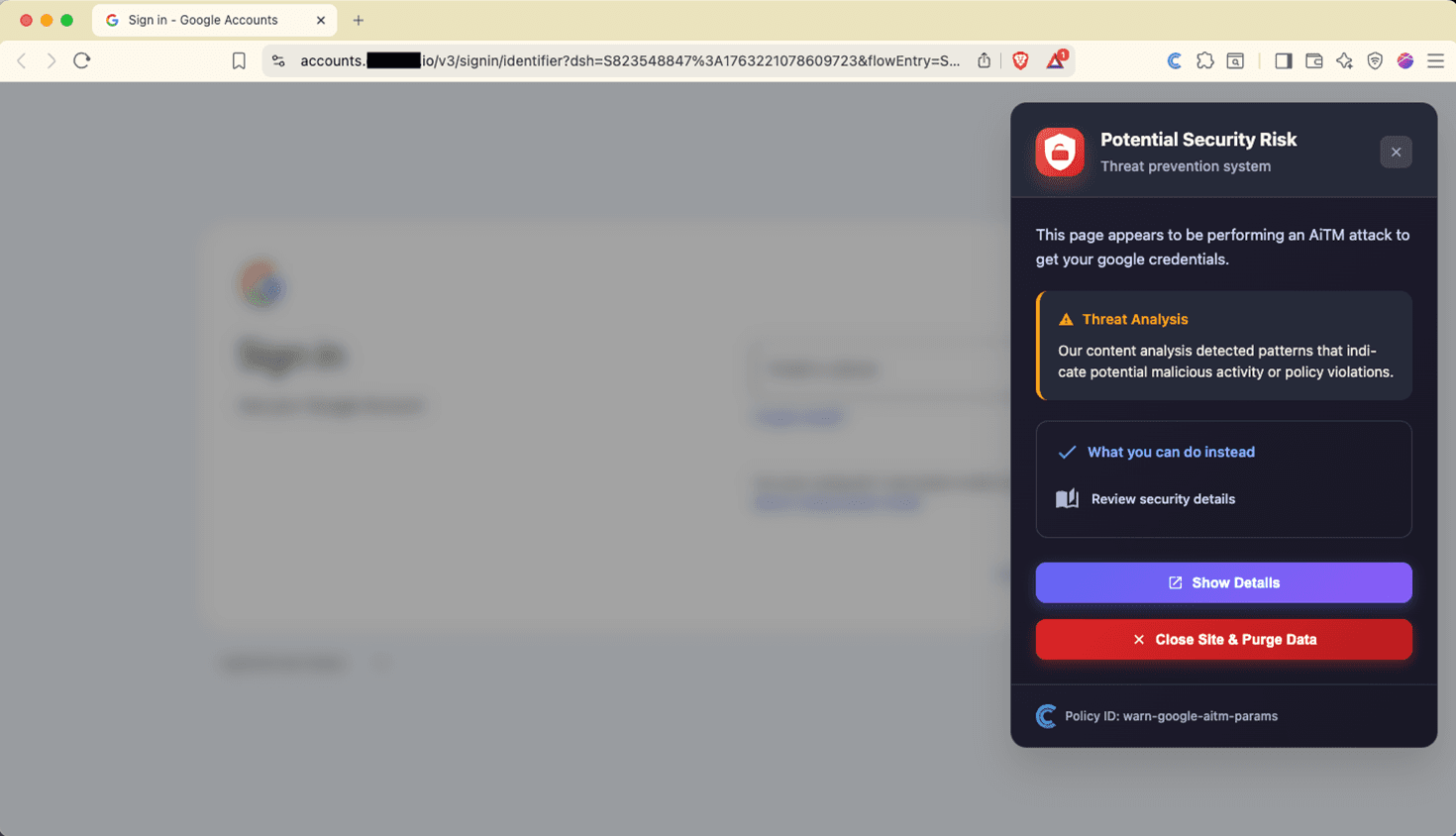
Figure 8 - Google AiTM Attack Detected
If an AiTM attack were to occur in the wild to one of our customers, they would be blocked. Our custom block page gives the user the ability to leave the infected page or open the page in safe isolation. The latter allows you to go into an isolated session where you can see the page that would be displayed but you are not be permitted to enter any text via keyboard or copy/paste. In addition, when in isolation, no malicious scripts run in context of the user’s browser. The user is also given the option to submit feedback to the administrators to provide any information they deem appropriate. An incident report would be sent to the administrators so they will have record of the event and can start an incident response effort to investigate the initial phishing attack.
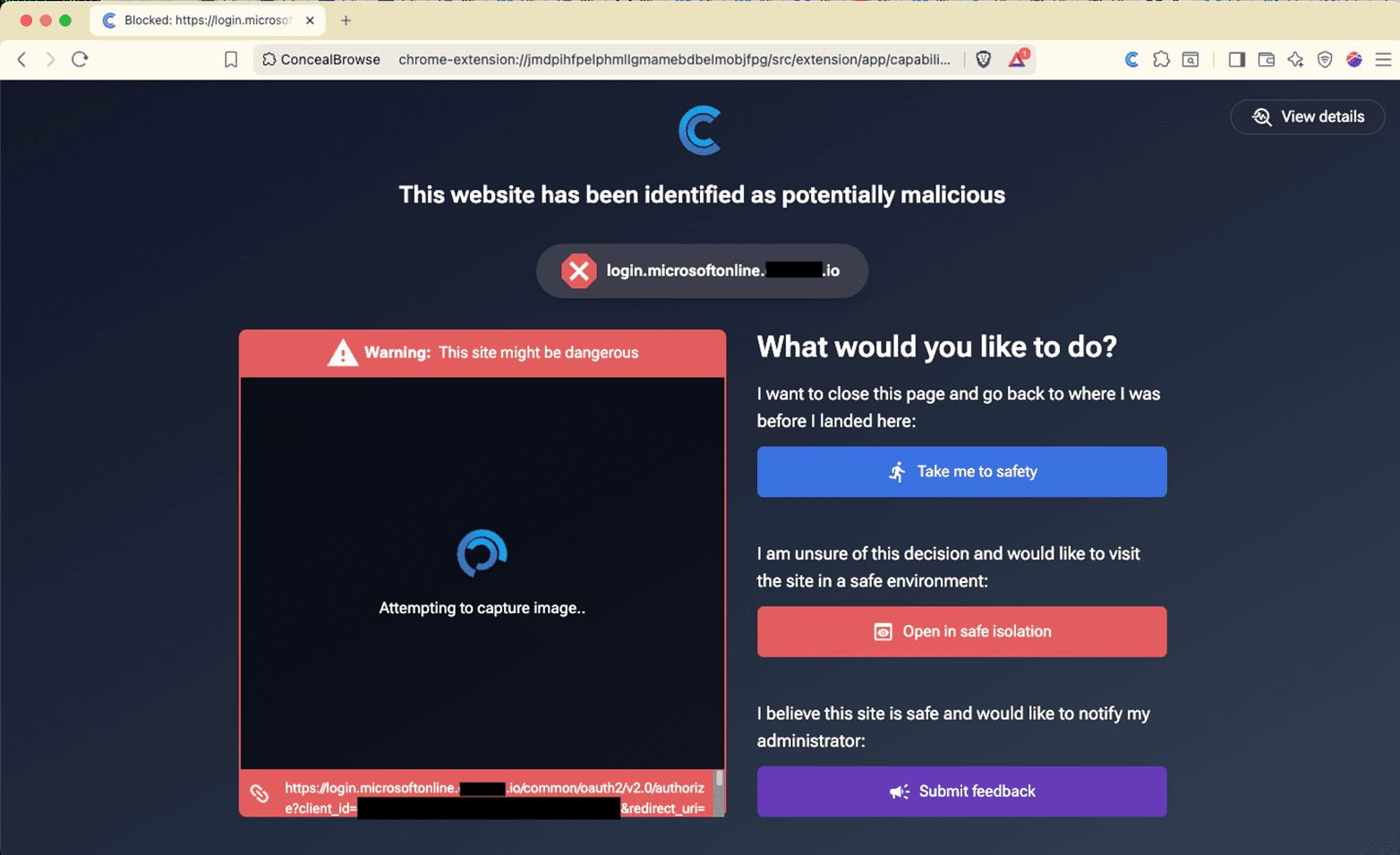
Figure 9 - Microsoft AiTM Attack Prevented
Threat actors TTPs (tactics, techniques, and procedures) are continuously evolving - improved tools regularly become available, new vulnerabilities are unearthed, once trusted websites become compromised. You need a security solution that remains one step ahead of that evolution. If you follow our blog, you will have already heard us discuss the need to have content in context. This is another example of where you need both pieces to prevent AiTM attacks. Content in context allows Conceal to continue to detect the evolutions of AiTM attacks.