
Author

Paul Halliday
Director Software Engineering
Category
Conceal Blog
Published On
Nov 20, 2025
Inspecting Downloads in the Browser: Catching Threats Before They Reach You
If you followed our four-part series on how the extension sees the real web – the version users get, not the lab-safe version scanners see – this next feature will feel like a natural extension of that story.
We’ve already shown how malicious scripts hide in plain sight, how dynamic pages shift after load, and how threat actors deliver different content based on who’s looking. Now we’re bringing that same philosophy to one of the quietest but most dangerous pathways in the browser: Downloads.
From disguised installers to region-specific payloads to ZIP files that only turn malicious the moment a real user appears, downloads have always been a blind spot. Browsers traditionally save the file first and ask questions later.
We’re changing that.
Our new download-protection system inspects files before they hit your traditional filesystem or become available to you, all inside the browser, using your real session.
Let’s walk through why we built this, how it works, and what it unlocks next.
Why We’re Doing This
Most browsers treat downloading a file as a simple transaction:
The user clicks.
The file lands on disk.
Maybe something inspects it after the fact.
That leaves a dangerous gap. Attackers know this, and they take full advantage:
Compromised sites injecting hidden downloads
Installers disguised as documents
Payloads that only appear for specific regions or devices
Blob-generated files synthesized by hostile scripts
Files that change content after the first request
The most important lesson from our earlier series applies here more than anywhere:
Remote scanners don’t always see what you see. And they don’t always get the file you get.
Threats often reveal themselves only inside the user’s real browsing context. So our goal was simple:
Inspect the file the user actually received, in the environment the attacker actually targeted.
And do it before the user – or their operating system – ever interacts with the file.
How It Works
There are two main protection paths, depending on your settings and policy environment.
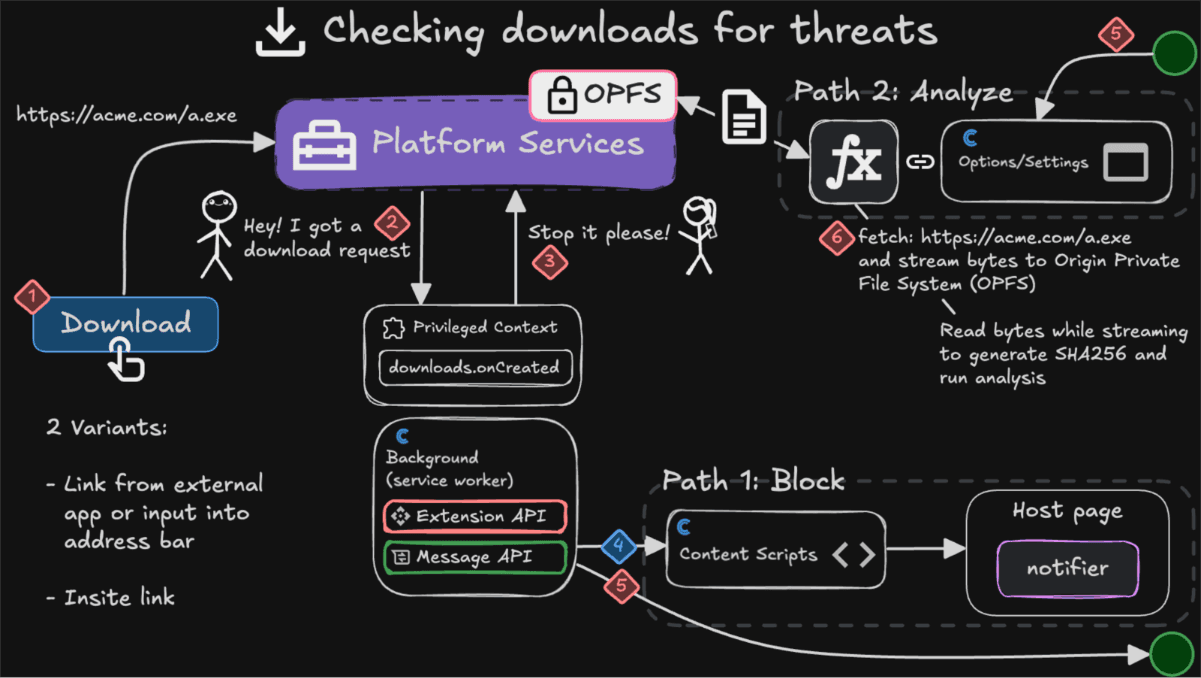
Flow A – Immediate Blocking with Strict Policies
Some environments – schools, enterprises, secure workspaces – enforce rules such as:
Block all downloads from unknown or untrusted domains
Block executables outside approved sources
Block any script or installer files outright
When one of these rules applies, we:
intercept the download instantly
cancel it before anything touches the filesystem
clean up any temporary data
display a clear notification explaining what happened
It’s fast, predictable, and transparent.
Flow B – Download Protection with Analysis
This is where the deeper inspection happens.
1. We intercept the download
Before the browser saves anything, we cancel the download and take over.
2. We fetch the file ourselves
The extension performs the request using your real browsing session.
This matters because attackers frequently change payloads based on:
cookies
IP
region
timing
user state
3. We stream the file into OPFS
The Origin Private File System (OPFS) gives us a safe, origin-isolated workspace inside the browser.
It’s ideal for handling untrusted files because:
it’s confined to the extension’s origin
it never touches the user’s real filesystem
the browser never attempts to execute anything stored inside it
files must be explicitly read out before they’re exposed to the system
Think of it as a sealed analysis room inside the browser.
4. We analyze the raw bytes
No trust is placed in:
the filename
the extension
the MIME type
We analyze what’s actually in the file:
identify true file type using signature bytes
extract metadata where available
compute a SHA-256 hash
check reputation across multiple intelligence sources
detect malware families, loaders, trojans, and known malicious samples
This is the same principle as the DOM engine from our series:
inspect what’s really there, not what it claims to be.
5. We present a verdict
If the file is malicious:
We show a clear explanation of what was found and delete it from OPFS.
If it’s clean:
We read the same inspected bytes back out of OPFS and deliver them as a proper download.
Why not just re-download the file?
Because:
the second request may return a different file
payloads change based on session or IP
attackers often hide malicious content behind one-time URLs
remote scanners frequently get a different result than real users
We only ever deliver the exact bytes we analyzed. No surprises. No substitutions.
What This Unlocks Next
Now that we have an isolated, browser-native workspace for file inspection, the possibilities expand quickly.
We can now safely build features such as:
nested archive scanning (ZIP, TAR, TGZ, 7z, etc.)
WASM-powered static analysis directly in the browser
entropy-based heuristics for packers and obfuscators
PDF internal structure inspection
macro and embedded-script detection in Office documents
multi-layer threat scoring
lightweight ML models to classify suspicious file structures
All without leaving the browser and without exposing the OS.
It’s the same core idea behind our earlier series:
Threats should be analyzed in the environment where users interact with them – not somewhere else.
Putting It All Together
This new download-protection system continues the theme we’ve built throughout the series:
Security belongs inside the browser, where the real action happens.
With this system:
downloads are intercepted before they reach your filesystem
untrusted bytes are inspected in a safe, isolated workspace
analysis runs on the exact file you were offered
if we find malicious content, we can disarm the threat
clean files are delivered back to you with a higher level of confidence
every action comes with a clear explanation
It’s precise. It’s private. And it gives the browser a new defensive layer it never had before.
More importantly, it opens the door to deep, browser-native file analysis – something servers and remote scanners simply can’t replicate.
This download-inspection system is still a young feature in our platform, but it represents a major architectural milestone. We now have a safe, isolated workspace inside the browser where we can study files before they ever become accessible to the user, apply real intelligence to them, and make informed decisions about their safety. It shifts the browser from being a passive conduit to an active guardian.
Over the coming months, we’ll continue to expand what this sandbox can do — deeper static analysis, richer metadata extraction, behavior-informed scoring, and the ability to understand entirely new classes of threats. Today’s foundation gives us the room to grow into a truly full-featured in-browser file security engine, and this is only the beginning.